@suman Just had a look into this and there is no ks boot line entry or ip=dhcp when using “Troubleshooting - Install Rockstor in basic graphics mode.” so I’ve created a github issue for it.
@Dustin_Van It appears the ks.cfg that @suman mentioned is in deed not being picked up during the basic graphics mode install. Until this is sorted the easiest work around is the following:-
Select "Troubleshooting"
Highlight "Install Rockstor in basic graphics mode" but don't press enter yet
Press the TAB key
This should bring up some text at the bottom of the screen
To this text add the following.
ip=dhcp ks=hd:LABEL=Rockstor\x203\x20x86_64:/ks.cfg
You can now press ENTER
The screen should look like the following just prior to pressing the ENTER key:-
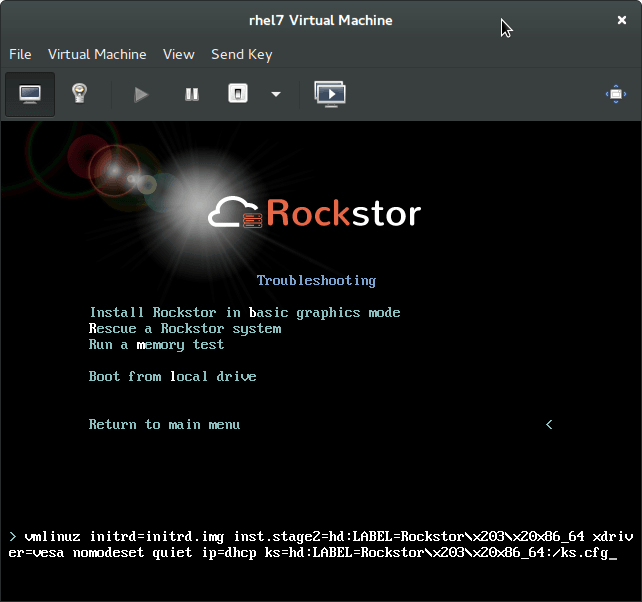
Note that the trailing underscore character at the end is actually the cursor.
The effect of this it to inform the installer of various package selections and partitioning requirements, hence your difficulties.
You should now find that things are simpler, although because you already have a system installed on the system disk (the leftovers that @TheRavenKing referenced) you will have to follow though with a - reclaim space - delete all - reclaim space - selection flow. You will be prompted with dialogs that offer these options once you press done on the “Installation Destination” screen.
Hope that helps.