Hi again,
I was playing around with the Quotas on my main server, in order to have a better overview of the size of all the shares.
I had the Quotas disabled for a while now, and would like to enable them now. Unfortunately the Rockstor UI always show the “Quotas” setting as Disabled, even when I enable the quotas via the commandline.
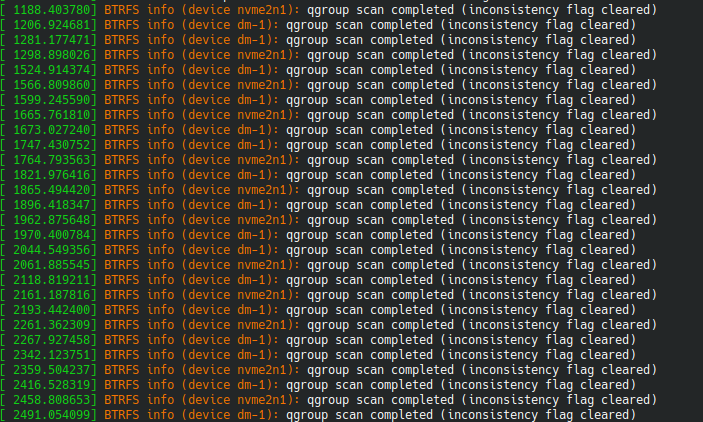
Furthermore, loading the web UI (e.g. Dashboard) will trigger endless btrfs quota rescans under the hood.
Some things I have tried:
-
In the web UI under Storage > Pools: enable the Quotas via drop-down menu
Result:
when reloading the web UI, they are still “Disabled”. Even when waiting for a night. -
Disabling quotas again & enabling them via cli
sudo btrfs quota enable <path>
This automatically triggers a btrfs quota rescan that can be monitored by
# Se if rescan is active
sudo btrfs quota rescan -s <path>

# Wait for current rescen to finish
sudo btrfs quota rescan -W <path>
After a while the rescan is done and calling the above commands will evidently show, that no rescan is active.
As a result, the size of all subvolumes can be viewed from the command line
sudo btrfs qgroup show <path>
I then once again verified, that no quota scans are active and opened the Rockstor web-UI. Within a few seconds, another quota rescan is triggered …
… and the web-UI still shows the “Quotas” as “Disabled”.
… also enabling the Quotas once again through the web-UI does not change the behavior.
… also rebooting the server didn’t change anything.
As long as the web UI is open (even the Dashboard), the BTRFS quotas is constantly rescanned. Also shown by dmesg:
Some other information:
A few days ago, I made a fresh rockstor installation on a backup server. It had the Quotas Enabled and they do work there correctly (without constant quota rescans)
Version: Rockstor 5.1.0-0 built on Leap 15.6
Cheers Simon
