Disk Errors, Pool Mismatches, and More.. Much More

Hello, all!

So here’s a weird one - old server (HP Micro 8gen) started flaking out so I retired it and built it anew last year with an 8-bay NAS case, purchasing two new IronWolf 10Tb SATA drives for MORE STORAGE. I had four 4Tb drives from the old server, and a spare 3Tb so I chucked it into the case because why not. Built two pools: “Storage” with the two 10Tb drives (intending to replace the others as I could afford it), “Old_Stuff” with the four 4Tb drives (for which pool recovery “just worked” and all four drives re-assembled as a pool when asked).

Moved shares off the “Old_Stuff” pool into the new “Storage Pool” to prep for eventual replacement, and then things got weird and I had to shelve the “buy more drives” project for a bit.
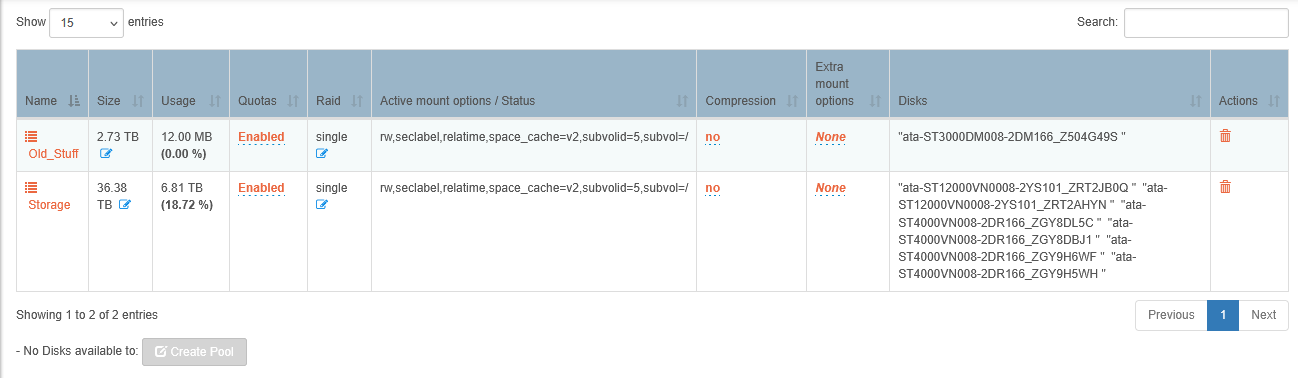
(You may notice something strange there, based on the description - foreshadowing, if you will)

Nevertheless, everything was running smoothly… until now. See, bond0 crashed out (working that issue separately) and when I finally managed to un-bond it to see what was going on, the GUI shows me that things are… confused:
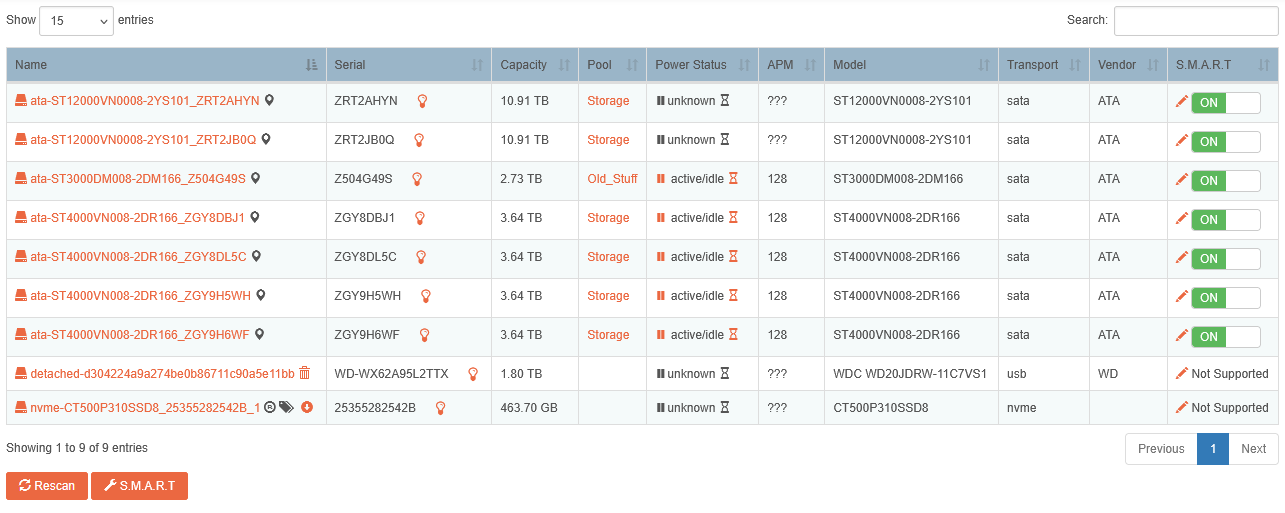
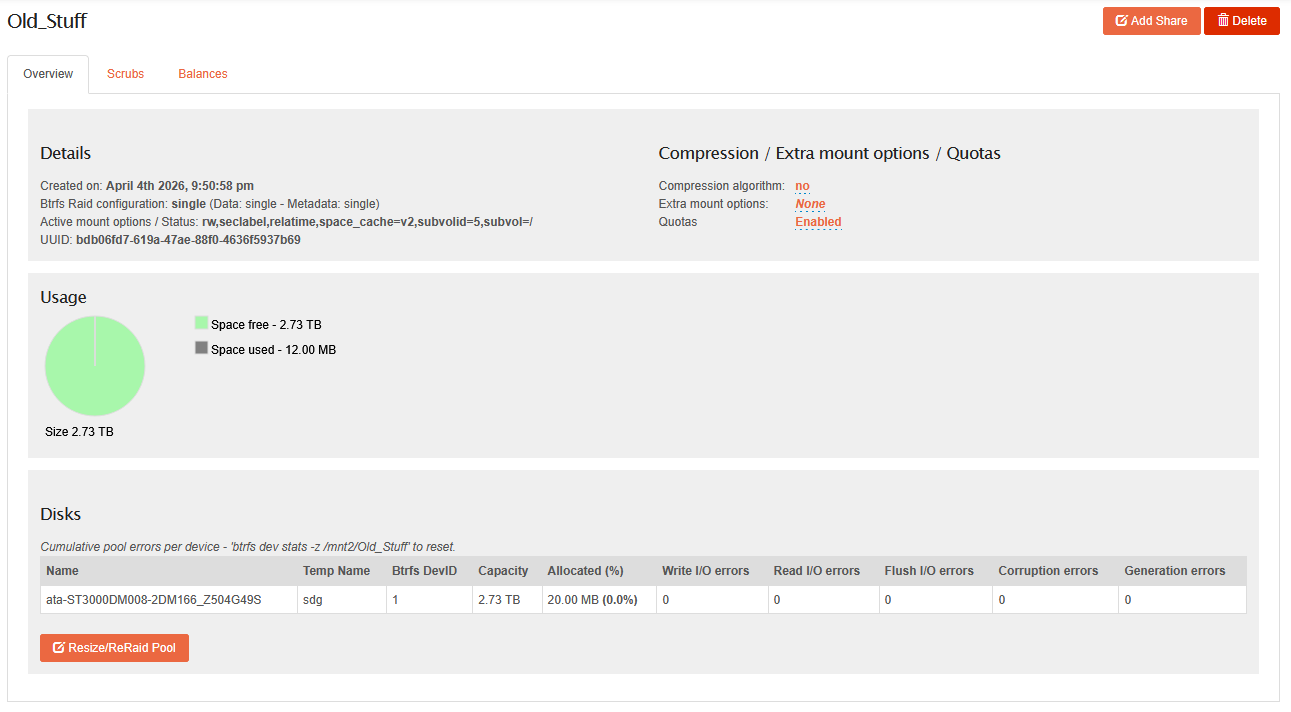
So, top two drives (THE NEW ONES?!?!) are currently flaking out, multiple read errors OMG). Can’t worry about that right now. The 3Tb “why not spare drive” now thinks it’s the only member in the “Old_Stuff” pool, even tho it was never a member:
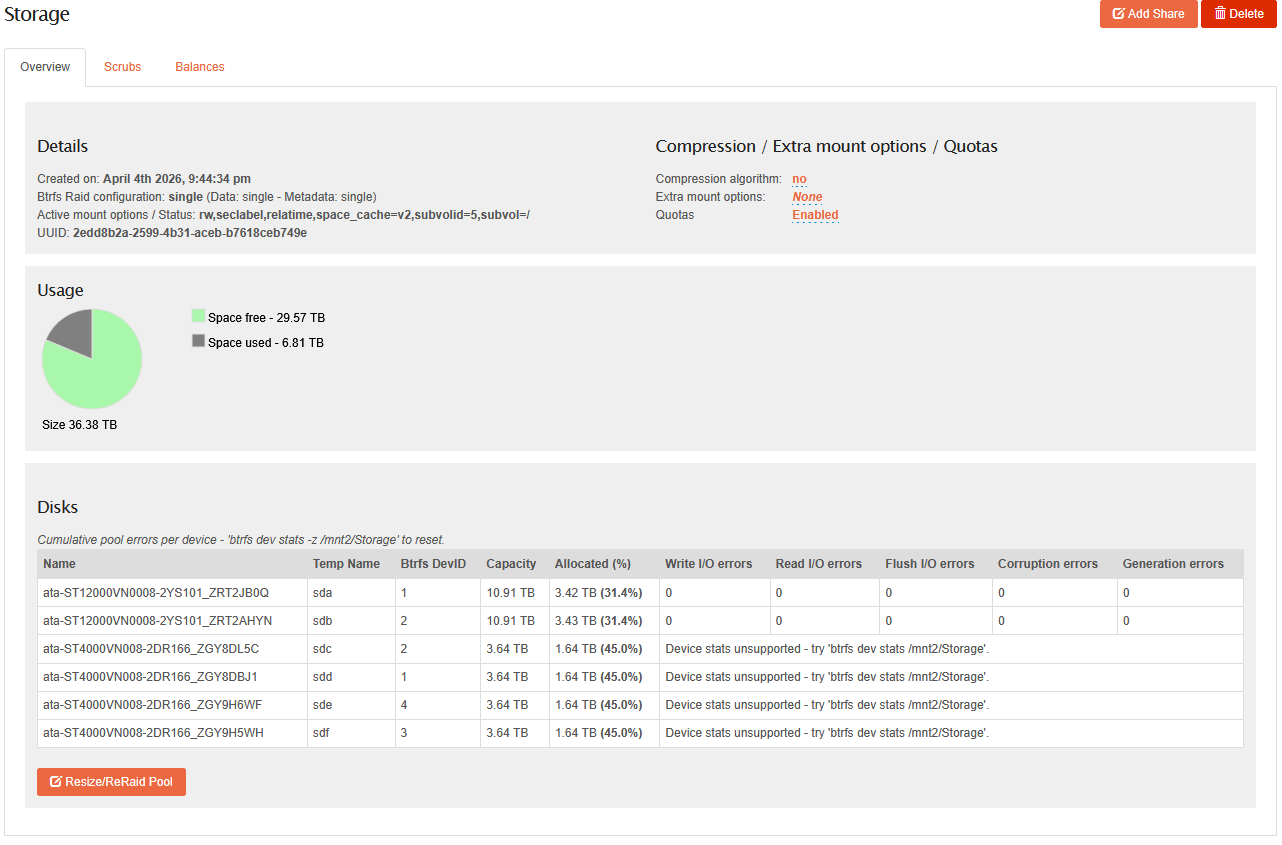
And EVERYONE ELSE is in the “Storage” Pool. (Not sure if it’s significant, but I now have multiple 1 and 2 devices in the pool. Devices that are supposed to be in the other pool):
Trying not to panic because while I do back up via CrashPlan-Pro… there’s a ton of home movies, photos, a massive CD collection, and a ton of DVD/BRDs I laboriously ripped onto the server… and I would prefer not to have to rebuild everything from scratch.

So finally to the questions:

  1. How bad is this? Everything seems to be working well enough with the shares, still accessible via CIFS/NFS etc. Should I just adapt to this new normal and not worry?
  2. Is there a way to massage this so that everyone shows up in the correct pool so I can stop worrying about massive amounts of data loss in my near future?

Advices welcome, as always. :slight_smile:

Cheers,

KeithF

@KeithF hello again. Sorry, I did not check anything over this long weekend.

No solution for you, but let’s see whether this is more of an UI issue, or indeed something going on under the covers.

Firstly, which version of Rockstor are you running, and which Leap or Tumbleweed is it based upon?

Secondly, if you go to the command line and run btrfs filesystem show (or with sudo, if you’re using the Web-based shell), what does it show you? The same situation (devices assigned to the wrong pools or not at all, etc.) you’re observing in the Web UI or different?

2 Likes

@KeithF Hello again.

Could you clarify a little more here, re:

Rockstor’s internals assume unique Pool and Share names within an install. This is a current limitation and enforced within the Web-UI on the creation & import (for shares) side. However if pre-configured devices (btrfs-wise) are attached, that have duplicate Pool or Share names, confusion will ensue: primarily on how this is all represented within the Web-UI. All down to this unique naming constraint enforced only during Web-UI creation of say a new Pool. We also enforce this during pool import for shares, but of course there is no import if devices belong to a know (by name) Pool!

I think this is what has happened here based on your “Built two pools: “Storage” …” comment. As Hooverdan indicated - what we need here is a system level confirmation of this assumption via:

btrfs filesystem show

If you could copy the output of that command (run as the root user) into this thread we should have more to go on. And then a path to teasing these Web-UI only merge “Storage” Pools that actually have distince uuids.

To your questions:

If you avoid Web-UI manipulations; it is currently cosmetic! But not belittling the apparent horror here :). The Web-UI sees all “Storage” pool members as belonging to the assumed unique “Storage” labeled pool, only in your case it is actually two distinct Pools created on two different systems initial if I have read the history correctly here. My appologies otherwise of course as we are nearing a new release so I’m a bit pushed time wise currently.

Definitely, if my assumption is correct re two system independently created “Storage” labelled Pools then attached to the same host (who previously had a Pool of that same name/label. However it could be a delicate operation. We can tell more once we have your command output as we can then mimic this situation via VM to confirm a neat way around this. We have Web-UI tools planned to help with such things but are currently in the throws of milestones that pre-date this effort. All in good time hopefully.

Thanks for the report - and my apologies for this short-fall. If it is what I think, we guard against in creation on the existing system - but can’t cope currently when two systems same-name pools are attached to a single system. We have begun this work however and have to complete a move to uuid as canonical for Pool and Share identification.

Oh dear - that’s not good! Outside the realm of Rockstor but yet, cause for concern there. Lets get these Pools teased apart (if that is the confusion cause) first as you can then seem more what-is-what.

Hope that helps, and lets see that command output so folks all around can see the situation and we can duplicat locally to find a way to resolve at least that confustion.

1 Like

Bonjour, Phillip and Dan! :slight_smile:

Long weekend and brief hospitalization delay on this side, so no worries and sorry it took so long to get back to you. :frowning:

I’m currently running Rockstor 5.1.0-0 on openSuSE Tumbleweed 20260402.

And here’s the output from the “btrfs filesystem show” command:

raven:~ # btrfs filesystem show
Label: 'ROOT'  uuid: cbfce5f5-49d8-49b1-83ac-854176beab2b
        Total devices 1 FS bytes used 17.70GiB
        devid    1 size 463.70GiB used 21.05GiB path /dev/nvme0n1p4

Label: 'Old_Stuff'  uuid: bdb06fd7-619a-47ae-88f0-4636f5937b69
        Total devices 1 FS bytes used 176.00KiB
        devid    1 size 2.73TiB used 20.00MiB path /dev/sdg

Label: 'Storage'  uuid: 2edd8b2a-2599-4b31-aceb-b7618ceb749e
        Total devices 2 FS bytes used 6.81TiB
        devid    1 size 10.91TiB used 3.42TiB path /dev/sda
        devid    2 size 10.91TiB used 3.43TiB path /dev/sdb

Label: 'Storage'  uuid: 7ab39728-769b-4ca2-ae16-cce62a7b3a82
        Total devices 4 FS bytes used 6.53TiB
        devid    1 size 3.64TiB used 1.64TiB path /dev/sdd
        devid    2 size 3.64TiB used 1.64TiB path /dev/sdc
        devid    3 size 3.64TiB used 1.64TiB path /dev/sdf
        devid    4 size 3.64TiB used 1.64TiB path /dev/sde
raven:~ #

So while the UI shows “Everything Everywhere All At Once”, the underlying BTRFS system shows things in the mostly-proper place. Volumes in the… erm… first “Storage” pool are the newest drives. The second “Storage” pool was actually the “Old_Stuff” collection from the previous Rockstor - plan being to migrate all the data off (rsync is another word for winning!) and remove those drives and shelve them against future need or new project. The one drive that is in the “Old_Stuff” pool was a 3Gb spare drive I tossed in to park some stuff I was moving from my wife’s old laptop to her new one.

So the good news is that the underlying OS seems to mostly know where everything is supposed to be.

Thanks in advance,

KeithF

4 Likes

Apologies for yet another delay - spending more time in hospital than I’d like.

Pools are stable, but yes I managed to double-label them both “Storage” because reasons. I’m guessing that if I can relabel one (or maybe both) pools via the CLI, I might be able to see some separation in the UI. Found a thread from 2019 here that mentions relabelling is being considered for inclusion. Checking on GitHub shows that the issue is still open, which is not optimal. :frowning:

I’m tempted to risk it via the recommended command line (e.g., “sudo btrfs filesystem label <mountpoint> <newlabel>” and see if Rockstor’s UI recognises the name change without losing its mind over it.

I’ll take recommendations - because with both pools still intermingled (at least according to the CLI, I can’t retire the old/small drives and repopulate the case with new/large drives.

As always, thanks ever so to @phillxnet and @Hooverdan for support and wisdom shared. :slight_smile:

Cheers,

KeithF

Drank more coffee and had a bit of a think (which takes a while in my case), and then dug into the BTRFS wiki to Level Up and Gain Knowledge.

Good news is, the state of the filesytem is the same as last reported even after an unscheduled system restart (note to self: buy a UPS real soon):

raven:/sys/fs/btrfs # btrfs filesystem show
Label: 'ROOT'  uuid: cbfce5f5-49d8-49b1-83ac-854176beab2b
        Total devices 1 FS bytes used 19.20GiB
        devid    1 size 463.70GiB used 24.05GiB path /dev/nvme0n1p4

Label: 'Old_Stuff'  uuid: bdb06fd7-619a-47ae-88f0-4636f5937b69
        Total devices 1 FS bytes used 160.00KiB
        devid    1 size 2.73TiB used 20.00MiB path /dev/sdg

Label: 'Storage'  uuid: 2edd8b2a-2599-4b31-aceb-b7618ceb749e
        Total devices 2 FS bytes used 6.81TiB
        devid    1 size 10.91TiB used 3.42TiB path /dev/sda
        devid    2 size 10.91TiB used 3.43TiB path /dev/sdb

Label: 'Storage'  uuid: 7ab39728-769b-4ca2-ae16-cce62a7b3a82
        Total devices 4 FS bytes used 6.53TiB
        devid    1 size 3.64TiB used 1.64TiB path /dev/sdd
        devid    2 size 3.64TiB used 1.64TiB path /dev/sdc
        devid    3 size 3.64TiB used 1.64TiB path /dev/sdf
        devid    4 size 3.64TiB used 1.64TiB path /dev/sde
raven:/sys/fs/btrfs #

I took a peek to see what the system actually thinks is here, and found out that one “System” filesystem is present (the two large drives), the OS root, and the “Old Stuff” single-volume filesystem:

raven:/sys/fs/btrfs # cat /sys/fs/btrfs/cbfce5f5-49d8-49b1-83ac-854176beab2b/label
ROOT
raven:/sys/fs/btrfs # cat /sys/fs/btrfs/2edd8b2a-2599-4b31-aceb-b7618ceb749e/label
Storage
raven:/sys/fs/btrfs # cat /sys/fs/btrfs/bdb06fd7-619a-47ae-88f0-4636f5937b69/label
Old_Stuff
raven:/sys/fs/btrfs #

The second “Storage” filesystem isn’t listed, which may or may not be an issue - perhaps another side benefit of calling two filesystems the exact same thing. Meh.

The command I made note of above would work to relabel a quiescent filesystem, but not sure if I want to mess around with umount/mount in this case (i.e., it’s up, that’s fine, don’t mess about).

The wiki doesn’t weigh in one way or another, but it does mention a more-or-less-approved method for adjusting a live filesystem label - via:

btrfs filesystem <old_label> /dev/by-uuid/UUID <newlabel>.

So by using this approach I can relabel one of the two “Storage” filesystems to something more sensible, like “The_Other_Storage” or “What_Were_You_Thinking” or “Dont_Ever_Do_This_Again”. :smiley:

I do still have the old semi-moribund donor host, my much-loved HP Microserver Gen8, but I’m not sure if I have enough spare hard drives laying about. I’d like to test this approach first and see if relabeling via the CLI method will cause the Rockstor UI to throw up. I could spend some credits in AWS and try it virtually, but I’d rather test type-to-type (real HDD vs notional ones) before committing to this course of action.

If I can scrounge up an old disk (or two) I’ll conduct a non-lethal experiment and report back. If not, I’ll try the virtual approach and see what happens.

As always, many thanks to everyone for any advice you can offer on this self-made disaster.

Cheers,

KeithF

1 Like

@KeithF I hope, your medical/hospital type episodes are/will be over soon. Hope, you’re doing better.

Like you pointed out above, I don’t think the WebUI will easily recognize the changes you might make by relabeling the pool at the command line level, since there is a database involved, etc.

So, doing that experiment on a non-production environment is probably a really good idea.

The only other thing I can think of:

  • perform your experiment to see whether it shows the desired results as you investigated. Instead of AWS you could presumably, in my opinion, also do this on a VM on your local PC (unless it’s way too weak to support that) using Virtualbox (or similar) if on a windows PC. As long as you also use a TW installation, you should still see comparable results, since you’re making more of a logical change, rather than, e.g. impacting a filesystem format change). I would contend that factors like a different type of BIOS would not make a difference for your testing.
  • if the experiment is successful, but would not make a difference in the Rockstor WebUI (as I would anticipate), and you still choose to go down that path with your “real” system, take a configuration backup via the WebUI and offload it to your local machine. Ideally, of course you also continue to have a backup of your files elsewhere.
  • Make the change to the pool using the command line.
  • Blow away the Rockstor OS drive, and re-install Rockstor (which should take you all of 10-20 minutes or so).
  • Create the same initial Web admin user and machine name as you had before.
  • After the pool imports (and now the renamed ones should show up in the WebUI with their associated shares, if any), upload the stored configuration via the WebUI and apply it to the system (depending on how many things you’ve set up, especially Rockons, it will take a few minutes).
    This should bring you back to your previous Rockstor state with the realigned pool names.

I would start with installing the current stable release (5.1.0-0) which you’ve been using prior anyway and not necessarily select the testing or edge channel to ensure stability for a little bit.

And, then, go get that UPS :slight_smile:

This is one of the things I always liked about the Rockstor architecture, that the OS/appliance is clearly separated from the data and making re-installs or new installs of a higher version fairly painless (with the config backup) if the normal upgrade path or some “irresponsible tinkering” (whic I do occasionally) runs into some issues. While that restricts some use case scenarios that are possible under btrfs, I have not felt constrained by this approach for the last 9 or 10 years.
But, of course I am not running this in a corporate production environment (though I do at least offline backups from a DR perspective), so there is that.

(OK, so finally well enough to remember how to type… :smiley: )

BLUF (Botton Line Up Front): I think I have a tested, proven, and practical solution to the issue.

Turns out that using VirtualBox was a very dry well, and I lost a couple of days trying to make it love me… erm… make it love the idea of multiple disk drives. Rockstor installer would see all the volumes and install in the first/designated OS drive just fine. But after installation was complete… nothing. It only saw the install disk from that point forward. Tried several combinations of drive controllers, and always the same thing - VirtualBox and Rockstor by itself works, but it only recognizes the first volume and just won’t pick up on any others.

So I packed it in, had another think, and remembered that as a self-deluded IT professional, I have resources far beyond those of normal users. I have access to a Broadcom support account thanks to my employer (I do VMware stuff professionally) so I was able to grab a copy of VMware Workstation Pro for gratis. This knowledge could come in handy someday so I suppose it’s business-related, if observed from a suitable distance in dim lighting.

But I digress…

VMware Workstation installed and running. Created a new VM with a 20Gb OS disk and a handful of small 5Gb disks. Installed Rockstor and rebooted. BEHOLD! All drives are visible now (yay!) but there’s a lot of error messages about how every drive has the same serial number. Shut down the VM, edited the .vmx file and added in the clause disk.enableUUID = "TRUE" and started the VM. No complaints now, so let’s build two pools of equal size and (because I’ve learned my lesson) label them pool01 and pool02. Then SSH into the VM, and use the command:

btrfs filesystem label /mnt2/pool02 pool_two

Back up configs, hold my breath, and trip the VM. Which comes back up, but pool02 is gone and isn’t in the /sys/fs/btrfs directory either… Start to panic. Reload configs, realize that the drives are still there even if the pool isn’t, switch to the Storage|Disks tab in the UI to take a look.

The drives are all there and several are flagged that there’s already a BTRFS filesystem present and would I like to import it? Thanks, and I believe I will do just that…

And pool_two appears in the pool list, all drives and shares in place. Think we’ve got a winner here. I’ll have to use the “by-uuid” approach

Also: Ordered a new UPS from Cyber Power Systems that’s NUT compatible and I’ll set it up as soon as this pool situation is sorted. Lesson learned, @hooverdan. The whole “which pool is you?” situation here may be interfering with my ability to create a new service account to drive NUT, and also won’t allow for updates or installation of new RockOns. So it’s in DOU (Dumb Old UPS) mode right now, but I’ll sort that next.

TL;DR (Too Long, Didn’t Read): I think this may work on production. I’ll try that next and let you know how it turns out.

1 Like