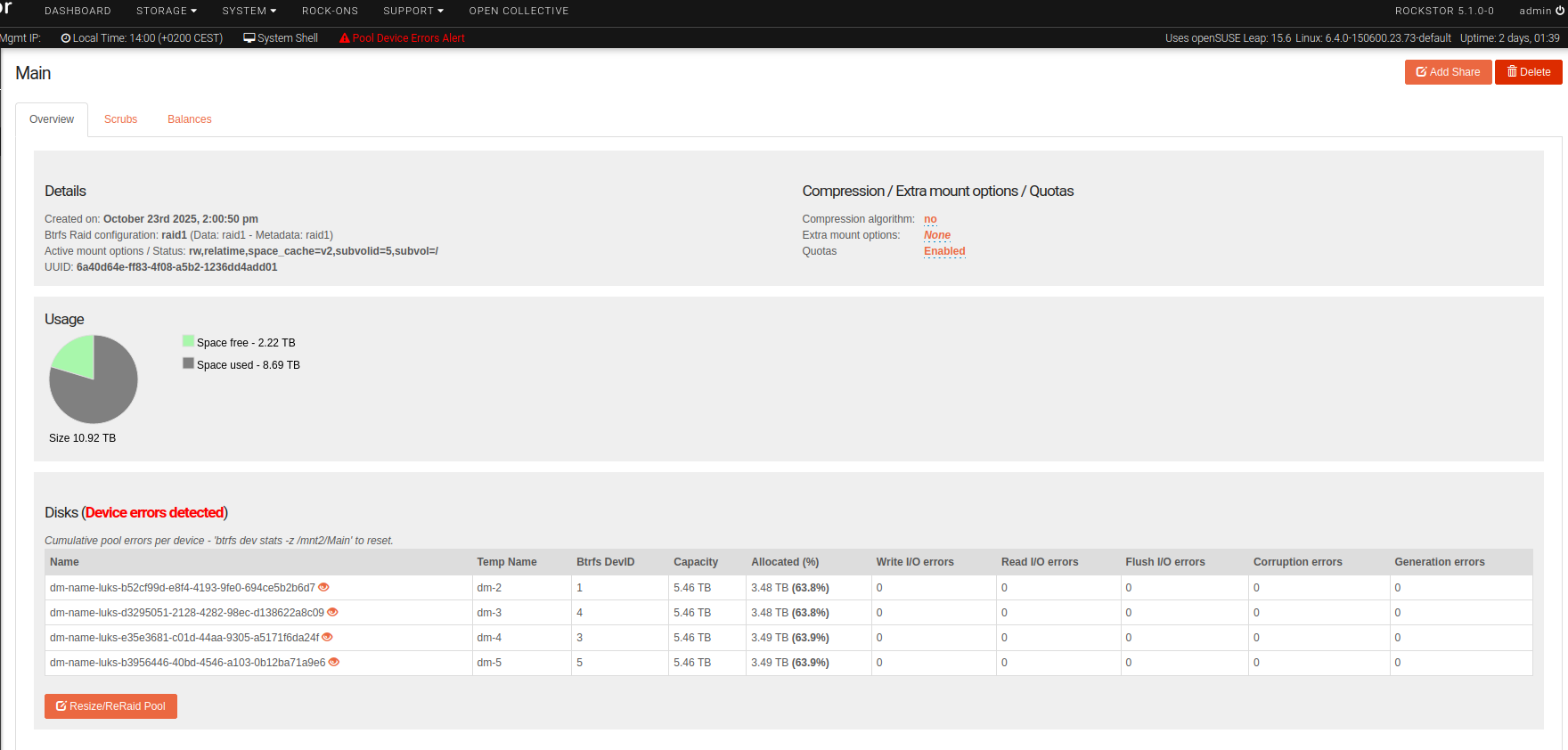
Failed and removed disk not shown in pool, cannot be removed

Brief description of the problem

I run Rockstor 5.1.0-0 on an old Fujitsu Primergy TX150 S8, which I rebuilt specifically for this purpose.

Until recently, it had 1 SSD for Rockstor and four 6TB SATA HDDs for the Main pool, each one LUKS-encrypted and set to auto-unlock on boot. The Main pool is configured as a raid1.

A few days ago, I added a fifth disk, set up LUKS encryption and added it to the pool via the “Resize/ReRaid Pool” button/modal in the WebUI. I kept the profile as raid1 and new balance operation started.

During the balance, which took ~32h, one of the older HDDs seems to have failed completely:

  • both the LUKS volume and the disk itself were marked as “detached” in the Rockstor UI
  • the device file /dev/sdb was gone
  • the disk didn’t even show up as a physical disk in the output of the MegaRAID CLI command and trying to query the slot gave the same output as if there just wasn’t a disk in there, at all, and
  • the orange fault indicator LED was on next to the disk’s slot in the server’s disk enclosure.

There are also some additional warning messages in the WebUI:

  • a “Pool Device Errors Alert” message at the top of each page and
  • “(Device errors detected)” warnings in the “Disks” sections of both the overview of all pools and the Main pool overview panel.

But here’s the puzzling thing: there were and are no detached/missing disks listed in the Main pool overview, so none can be removed, either. It only lists the four working disks.

Deleting the detached disks from the Disks page did not change this, nor did physically pulling the disk out of the enclosure.

The balance operation finished successfully and the pool now still shows four disks and no detached/missing ones, but the warnings persist.

I logged in via SSH and checked the Main pool’s filesystem with btrfs fi show /mnt2/Main. It still lists a total of five devices.

How do I proceed here?

Detailed step by step instructions to reproduce the problem

  1. Create a pool with a raid1 profile on top of some LUKS-encrypted disks (don’t know if there need to be four of them)
  2. Add another disk to the system, LUKS-encrypt and unlock it
  3. Add it to the pool via “Resize/ReRaid pool” button and modal, let the balance operation start
  4. While the balance is running, physically remove one of the old disks

You should see the removed disk and its LUKS volume listed as detached on the Disks page, but not on the pool’s overview page.

Web-UI screenshot

Error Traceback provided on the Web-UI

Only

Pool Device Errors Alert

… at the top of each page and

(Device errors detected)

… in the Disks section of both the pools overview page and the overview panel on the Main pool’s page.

As I wrote, btrfs fi show /mnt2/Main outputs a list of 5 devices, all of them device-mapped LUKS volumes, of course.

By comparing those with the list of devices the Rockstor UI lists, I can identify the one “zombie” device that actually belongs to the removed disk.

I can confirm this by running btrfs device stats /dev/mapper/luks-<uuid>, which shows tens of millions of .write_io_errs (probably from when the balance was still running), while there aren’t any of those for the other devices.

I could remove that device using the btrfs CLI tool, of course.

That would probably trigger another balance, but by the end of it the state of the btrfs filesystem might be back in sync with what Rockstor thinks the state of the pool is.

I don’t know if that would get rid of the warning, but I’d be more confident to try a reboot and see if that helps – compared to now, where I’m afraid the system wouldn’t even come up properly.

The thing is that doing this might make it impossible to debug how the system got into this peculiar state with missing/detached devices that are not shown in the pool config, in the first place. So I’m a little hesitant to fix it now, in case a dev or someone familiar with the codebase has any questions.

I assume that part of the problem is with the fact that I’m using LUKS-encrypted volumes and the extra layer of abstraction that this represents. Especially since the device mapper doesn’t actually remove the mounted LUKS volume, even when the physical disk backing it has disappeared from the system.

I thought about this and I assume that Rockstor can recognise this condition, because it maintains its own mapping between physical disk and LUKS volume, so it can know that the LUKS volume must be detached, if the disk it resides on is detached.

But somewhere in that fault handling process something went wrong with the association between the pool and its disks and the detached LUKS volume device was seemingly removed from the list, but the knowledge that something’s not right with the pool is still there, somehow. It just can’t be fixed from the WebUI…

Little update: I decided to give the removed disk another try to see, whether it has actually failed, or not.

To that end, I inserted it into an unused slot in my external disk enclosure and – would you believe it – it showed up in the output of the MegaRAID CLI tool.

I was able to retrieve S.M.A.R.T. data from the drive, reviewed it and found nothing worrying there. I started an extended self-test. If that should finish without error, I’m considering returning the disk to its old slot and re-integrating it into the system.

Now, because the disk is connected via an adapter card, which cannot be configured to function in JBOD mode, I have to add every HDD to a “virtual disk” or “disk group” to even get it to show up in the system. As I don’t want to use the adapter card’s own limited RAID support, I always create a dedicated one of those for each disk. But the one for this HDD was removed alongside the disk itself. Meaning I might have to recreate it and it might not get recognised by Rockstor as the same disk it knew before.

I’ll post updates here on how all of that turns out.

2 Likes

The extended self-test finished without errors, so I took the disk out of the other slot and returned it to its original one. After some more debugging, I found that the adapter card had apparently “forgotten” its own config. for this drive and considered it “foreign”. I was able to import this “foreign” config, though, and now the physical disk (for want of a better word) shows up in the system again… but not the LUKS volume that belongs to it (even though the disk has the “unlocked padlock” symbol next to it)!

The Main pool still only lists four devices and the corresponding total capacity and the warning messages are still present, too.

I don’t know how to proceed here.

How can I fix this and bring the underlying system state back in sync with Rockstor?

I asked in the openSUSE forum and got the advice to wipe the disk, create a fresh new LUKS volume (which would have a different UUID) and then run btrfs replace with the old device as the source and the new one as the target.

I even wrote to the btrfs kernel mailing list for confirmation and got the feedback that yes, this was actually the best way to go about it.

I would like to do as much of this as possible through Rockstor, so the system is aware of the changes, so the actual system state and what’s in the DB doesn’t get out of sync.

Currently, Rockstor shows me the disk itself with the little open padlock, indicating an unlocked LUKS volume. But the corresponding volume is missing from the UI (and in fact the systemd service has failed).

I can go to the disk’s “role” page by editing the URL and replacing luks with role, but Rockstor doesn’t let me wipe the disk, because it thinks the LUKS volume is unlocked.

What do I do now?

I would wipe the disk manually via the CLI and then unplug it from the system and maybe reboot.

In the Rockstor UI the disk first will still show up, as it remembers what disks where used at some point before. But as the disk is not present at this point anymore, you can delete it from Rockstor UI.

Afterwards, plug the disk back in and proceed in the Rockstor UI.

Cheers
Simon

1 Like

I marked the disk as offline with the RAID adapter’s CLI utility, as a first step, and that caused it not to be shown at all anymore. It was as if I had just pulled the disk out of the enclosure. To be clear: that shouldn’t happen.

So I decided I couldn’t trust this disk anymore and finally completely replaced it.

As usual, I had to add a dedicated “Virtual Disk”/”Disk Group” for it, then it showed up as /dev/sdf in the system and with some WWN in the Rockstor UI.

I was able to wipe it, configure full disk encryption and set up auto-unlock for that disk. This creates the systemd service to unlock the disk, but doesn’t start it. I then identified and started the service from the CLI and the unlocked LUKS volume then showed up as a device in the Disks panel of the Rockstor UI.

Finally I started the btrfs replace from the CLI, which is running now.

FWIW, I had to use the device ID (a small integer) as the source device (instead of the full device file path) and also add the -r flag, so the read errors from the (actually non-existant) source device won’t interfere.

I wonder whether Rockstor is going to recognise the changed pool situation, once the replace operation is complete.

If not, then maybe a reboot will help and I’d feel much more confident doing one of those when the pool is running on top of functioning devices again. Although I will probably still have to do some cleanup before that (e.g. remove the systemd LUKS unlocker service for the old disk).

Just a quick question for following along:

Why shouldn’t that happen?
When the RAID adapter card disables a drive, I would expact exactly that behaviour, that the OS is not seeing the disk anymore …

Well, first of all the OS only sees those “Virtual Disks” or “Disk Groups” that the RAID adapter exposes to it. Those could actually have several disks in them, configured as a RAID. I happen not to use those capabilities. And because my card doesn’t support “IT mode” (making it act as a JBOD), I just add a dedicated “Disk Group” for each physical disk.

But still, AFAIK (and I’ve done this earlier, but I’d have to consult my notes again to be sure) simply setting the disk to Offline should not remove it from the disk group or remove the disk group itself.

And that’s what happened and why the OS lost /dev/sdf and Rockstor became aware that the disk was gone.

In addition, the MegaCLI tool then provided no output about the physical disk, which was still in its slot. Normally, it should give me all the disk data and just list the state as “Unconfigured (Offline)” os similar. Instead, the output was the same as for a slot w/o a disk.

Finally, the orange fault indicator LED was glowing steady.

Those last two things definitely shouldn’t happen when you simply change the physical disks state to Offline.

2 Likes

Thank you for the explenation.

At least know you know that the disk has definitely failed.

Pretty much, yeah, even though it doesn’t report any S.M.A.R.T. errors. It just behaves so weirdly in the enclosure that it’s no longer a good idea to use it.

1 Like

The btrfs replace finished successfully and a subsequent btrfs scrubalso ran through without errors.

So the FS is in a good state again, and the Pool Device Errors Alert has disappeared, as well.

HOWEVER:

  • Rockstor still lists the new unlocked LUKS volume as unused on the Disks page, even though it is actually now part of the Main pool’s FS.
  • Rockstor only lists four devices as being part of the Main pool – the new one is missing.

So there’s a disconnect between the actual system state and what Rockstor knows about w/r/t to the Main pool and the new unlocked LUKS device.

My question is how I can best fix this:

  1. Should I add the new device to the Pool through the WebUI?
  2. Should I reboot and hope Rockstor picks up the change?
  3. Is there some better/other way?
2 Likes

That’s good to hear that you raid is in a good state again.

From my understanding, Rockstor is just piggy-backing onto the BTRFS configuration and providing that information visually in the webUI.

I am not aware of any option to refresh the state of Rockstor, so after such a huge reconfiguration of drives, I would simply reboot the system and expect, that the changes are updated afterwards in the webUI.

2 Likes

I was considering just adding the missing device to the pool through the UI. I expected the operation to fail and throw an error (you can’t add a device to a pool it#s already a part of), but then I decided to follow your advice @simon-77:

… and after the reboot the Pool now shows all five devices.

As far as I’m concerned, that makes this issue resolved now.

EDIT: Thanks a lot for your advice @simon-77 !

3 Likes