Problem replacing a damaged disk

Problem replacing a damaged disk.

Good morning everyone.
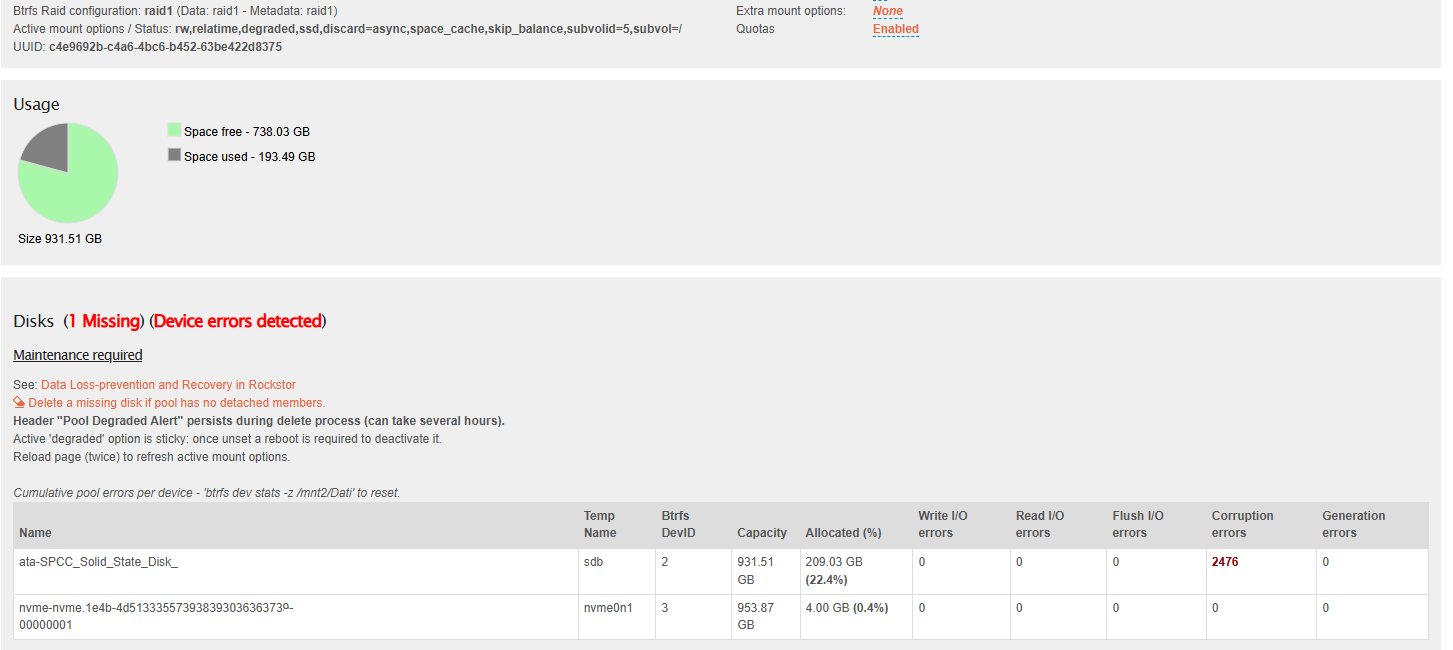
I’m in this unfortunate situation. In my RockStor system, I have a RAID 1 pool composed of a 1TB NVMe drive and a 1TB SSD. This pool stores the work folders for various RockStor applications, fast shares, and the cloud folder.
The NVMe drive suddenly started generating errors and slowing down the pool. I thought about removing the damaged drive from the GUI and replacing it with a new one (unfortunately, my MB only has one NVMe slot). RockStor won’t let me do that, reminding me that it’s part of a RAID 1 that requires at least two drives. So I decide to convert from Raid 1 to Single. The system accepts it and starts the balancing process, but it doesn’t complete successfully, which is where my problem lies. All the shares in that pool are unreachable. They appear unmounted on the Rockstor GUI, and obviously all the Rockstor drives stop working, and the pool appears to be an unknown type fo Raid.
The pool is still about 20% occupied, as before, and if I look in the System Shell, the folders and files are there.
Now, in my immense ignorance (is this used in English? Yes, in Italian :wink: ), since the new NVMe drive arrives tomorrow, I’m thinking of shutting down the system, replacing it, and hoping everything will be fine. But I’m asking you how I can avoid problems and the loss of data and Rockstor drives, which have been working perfectly for at least a year.
Wasting time is not a problem.

I apologize for the length and thank anyone who can or knows how to help me.

Davide

Hi @dadozts

I am sorry to hear about your drive failure and your troubles regarding the replacement.

First things first, do you have a recent backup of this RAID1 pool?


Unfortunatelly I have to tell you, that converting a RAID 1 with a failing drive to “single” profile was a very bad move.

You had the redundancy of Raid 1 and when you would have physically removed the failing drive (i.e. you only have the good drive in your system), then doing the conversion to single would have been okay, as the data would be “balanced” accross the single good drive.

In your instance, converting to Single split the data accross the good and the bad drive, with only one copy of each data block :confused:

Here is an excellent blog post talking about exactly this pitfall:


To deliver some meaningfull advice to your situation:

  • Yes, I would definitely shut down the system immediately (maybe run the commands at the end first, to get some diagnostic information)
  • Please note, that a started balance will continue after rebooting
  • I would resolve this issue by manually booting into a recovery OS from a USB-Stick and only mount the BTRFS pool with the skip_balance option to avoid further data loss

I assume that the conversion to single profile has not finished, so that some part of your BTRFS pool is still in RAID1 and some of it is already in single profile.

If that is the case, I would urge you to find a way to have both existing drive and any 3rd drive (with the size of your filesystem usage) on you system.

  • Either get a USB to M.2 adapter for your new SSD
  • Or get any external USB disk (also an external HDD will be fine) as temporary replacement for data recovery

When you have all 3 drives connected to your system, then use the BTRFS replace command to get all your data off the failing drive. As said before, I would to this from a live USB Stick in order that no one (Rockstor) mounts the pool and resumes the balance (convert to single). So basically:

  • Boot from a live USB (e.g. https://www.system-rescue.org/)
  • Mount the btrfs pool with mount -o skip_balance /dev/<your-disk> /mnt
  • If this command fails due to degragation, then additionally also add the degraded flag
  • Then start the btrfs balance operation, as stated in the rockstor documentation

If you have your system still running while reading this, then please run these commands before shutting down the server.
Don’t reboot to Rockstor, to avoid any further data loss !!!

  • Status of btrfs balance:
sudo btrfs balance status <mount-point>
  • Filesystem summary:
sudo btrfs filesystem df <mount-point>
  • Detailed device status:
sudo btrfs device usage <mount-point>

You can use any mount point of your BTRFS pool for these commands, you can find them by running the command mount (without arguments). It will probably be somewhere under /mnt2/<…>


Please post the outputs from the commands above, to better figure out what to do next.

Cheers
Simon

2 Likes

Thank you so much for your reply; you scared me, but it’s all about experience.
I’m at work right now, but all I can do is tell you what the system responded to the commands you suggested.
I have a backup of the shares with data inside the Pool on an external NAS, but not the Rocks-on portion and its configuration. Except in the automated snapshots.

for: sudo btrfs balance status

dado@Server:/mnt2> sudo btrfs balance status Dati
No balance found on ‘Dati’

for: sudo btrfs filesystem df

dado@Server:/mnt2> sudo btrfs filesystem df Dati
Data, single: total=2.00GiB, used=450.75MiB
Data, RAID1: total=210.00GiB, used=203.20GiB
System, RAID1: total=32.00MiB, used=64.00KiB
Metadata, RAID1: total=3.00GiB, used=2.22GiB
GlobalReserve, single: total=288.98MiB, used=96.00KiB
WARNING: Multiple block group profiles detected, see ‘man btrfs(5)’
WARNING: Data: single, raid1

for: sudo btrfs device usage

/dev/nvme0n1, ID: 1
Device size: 931.51GiB
Device slack: 0.00B
Data,single: 1.00GiB
Data,RAID1: 210.00GiB
Metadata,RAID1: 3.00GiB
System,RAID1: 32.00MiB
Unallocated: 717.48GiB

/dev/sdb, ID: 2
Device size: 931.51GiB
Device slack: 0.00B
Data,single: 1.00GiB
Data,RAID1: 210.00GiB
Metadata,RAID1: 3.00GiB
System,RAID1: 32.00MiB
Unallocated: 717.48GiB

WARNING: Multiple block group profiles detected, see ‘man btrfs(5)’
WARNING: Data: single, raid1

Davide

Thanks for sharing the details @dadozts

  • It is excellent,that the Metadata is still in RAID1 profile exclusively
  • You have 1 GB of “single” Data on each device, so let’s hope we get that data back of you failing drive.
  • Worst case scenario would be, that this 1 GB can not be recovered.

As the balance operation is not running anymore, it should also be fine to continue in Rockstor with the data recovery. Maybe just double check with the btrfs balance status command, that no balance is running, after reboot. And also ensure that nothing is accessing the shares while you recover your data, by e.g. disabling the Rock-ons.

To avoid these gotchas, I would continue on a live USB stick and only mount the pool manually with the skip_balance option explicitly - but my big red warning is from now on only an orange warning :wink:


As said before, I would urge you to find a way to connect a 3rd >= 250 GB disk and then btrfs replace the failing SSD with the 3rd drive.

Either you use another M.2 adapter for your new disk, or any other temporary disk, like an external USB-HDD.

Basic steps:

  • use btrfs replace to replace the failing disk with the new one
  • then restore RAID1 redundancy by running btrfs balance start convert=raid1,soft <mount-point> (note the “soft” filter only touches the 2GB that are not in radi1 profile already)
  • If you used a temporary 3rd drive, remove your old M.2 and insert your new M.2 and then again, btrfs replace the temporary drive with the new M.2

Another approach would be, to restore the RAID1 profile with your current 2 disks.

Though, I would seems this approach as weaker, as the failing SSD will be used to read the 1 GB single data from it and to write 2 GB in total to restore the RAID1 profile. As these steps can’t be separated, you might increase the risk of a SSD failure, compared to the btrfs replace, that will only read data from the failing drive.

Basic steps:

  • Run the balance with the “soft” filter !!! , to only change the already converted 2 GB single back to RAID1: btrfs balance start convert=raid1,soft
  • If you ensure, that all your data and metadate is in RAID1 again (check, double check and check again) you could just remove the failing drive, and then btrfs replace the missing drive with the new one

As said before, running the btrfs replace with 3 disks present is definitely your safest bet.

Cheers Simon

4 Likes

Thanks, you’re always so quick and punctual.

I’ll give you a quick idea. If I understand correctly, if it’s a viable option, then I’ll actually choose what you explained.

If I connect the new NVMe drive with a USB adapter and merge it into Radi 1, my degraded pool, this should become a Radi 1 pool with 3 drives, one of which is degraded. At that point, I can remove the degraded drive from the pool, physically remove it from the MB, and insert the new one. Could that work?

Davide

2 Likes

Hi @dadozts

As I am not sure whether you want to follow the steps I outlined previously, or do something else, let me clarify some technical details.

  • When you would add btrfs device add the new NVMe to the pool, your BTRFS RAID1 filesystem would span 3 device. Only new writes or a balance operation would move some data onto the new (3rd) drive.
  • If you then would start a balance operation, all the data is balanced accross all drives, resulting in a lot of write operations also to the old failing drive.

To be clear, this is something you should avoid. Be happy about every bit you get from your already failing drive that is still intact, and don’t stress the failing drive with writing a lot of data to it.

  • Due to the conversion to “single” profile you started, your pool is currently in a mix of RAID1 & single profile. Even after you would have added a 3rd drive, you still would need to run the balance operation to get all of your data back to RAID1 profile.

In short: before adding a 3rd drive and removing the failed one subsequently with different commands, you are much better of using the replace command btrfs device replace to do it in one step.

This will add the least write load to your failing drive and maximize your chance of data recovery.


When you get a M.2 adapter to connect your new drive as 3rd drive, you can simply run the btrfs device replace command and once that is finished, you BTRFS filesystem only uses 2 devices, with the old failing drive removed from the pool.

Then you can simply power off the server, remove the old M.2 SSD from your MB, insert the new one (which was in the M.2 adapter previously) to your MB and boot your server again. Then everything should be normal again.

4 Likes

Thanks for your clarifications and explanations.
I don’t intend to follow my own idea; I’ll use what you suggested. I hope to do it today; yesterday was too late when I finally got home.
The USB adapter should also arrive today to connect the new NVMe drive externally and follow the replacement procedure you suggested.

What I shared with you was my idea, and I was sharing it with you, who explained to me perfectly and technically why it might not work. Thanks for that too.

Davide

Davide

3 Likes

Dear Simon, I’m still here taking up your time, but I swear that if you pass by my area on the border between Italy and Slovenia, a good Prosecco will always be waiting for you.

Now that I have everything with me, the new NVMe and USB adapter, I followed your suggestion and ran the command

sudo btrfs balance start convert=raid1,soft /mnt2/Dat1

After 24 hours, however, the process seems to have finished, but the status of the Data Pool is still this:

sudo btrfs device usage /mnt2/Dati
/dev/nvme0n1, ID: 1
Device size: 931.51GiB
Device slack: 0.00B
Data,single: 1.00GiB
Data,RAID1: 210.00GiB
Metadata,RAID1: 3.00GiB
System,RAID1: 32.00MiB
Unallocated: 717.48GiB

/dev/sdb, ID: 2
Device size: 931.51GiB
Device slack: 0.00B
Data,single: 1.00GiB
Data,RAID1: 210.00GiB
Metadata,RAID1: 3.00GiB
System,RAID1: 32.00MiB
Unallocated: 717.48GiB

WARNING: Multiple block group profiles detected, see ‘man btrfs(5)’
WARNING: Data: single, raid1

and not, as I perhaps mistakenly thought, a Raid 1 Pool with a damaged disk.

At this point, however, I have a new NVMe drive in a USB enclosure that my RockStor system detects and makes available to me, but if I go through the RockStor GUI to interact with the Data Pool, it won’t let me remove the damaged disk, and the replace button is grayed out. It would only let me add the new disk to the Pool, but that’s something you strongly advised me against doing.

At this point, what should I do? From the command line? (Can you help me?) Or do you have other solutions?
I doubt if I shut down, remove the bad disk, and replace it with the new one, because the pool isn’t recognized as RAID 1, but as unknown.

Thanks again for your patience and expertise.

Davide

1 Like

Hi @dadozts

Maybe the balance operation did fail again …
Just to be sure: your command did start the balance on /mnt2/Dat1 while the device usage command was on /mnt2/Dati.

Was this a typo in your forums post, or did you call the balance operation on a non-existant mountpoint?


However, when you have all 3 SSDs attached to your system, the next step is to run the btrfs replace command.

The BTRFS Replace command is not yet implemented in the UI. Therefore you should use the CLI for this. You can find the reference for btrfs replace here: btrfs-replace(8) — BTRFS documentation

Basically you should:

  • find the device path of your new SSD (e.g. /dev/nvme1n1)
  • find the device ID of the failing drive (e.g. 1)
  • then run the btrfs replace command

Let’s break it down:

  1. To list the device paths, run:
nvme list

or, if this is not available, run lsblk from the CLI

:warning: Please double check which SSD is the old, failing drive and which is the new one. Don’t take my guesswork for granted, and double check which drive is which :warning:

  1. To list the device IDs, run:
btrfs filesystem show <mount-point>
  1. btrfs replace command:

Use the -r switch, to spare the failing drive. All RAID1 data will be read from the other good drive, and only data exclusively available on the failing SSD will be read from it.

Simply insert the correct device path and ID, and start the BTRFS replace by:

btrfs replace start -r <failing-ID> <new-device-path> <mount-point>

Please check your actual device IDs and device paths, but based on you previouse output I suspect something like

btrfs replace start -r 1 /dev/nvme1n1 /mnt2/Dati

Once the replace has started, you can watch the status by running:

btrfs replace status <mount-point>

Let me know, how you are getting along, and don’t hesitate to ask again, if you are unsure about the device ID and device path.

Cheers Simon

PS.

Correct, don’t do that! Use the btrfs replace with all 3 disks attached

PPS.

:innocent: I warn you, don’t make too many promises, as I could potentially pass this area.
:waving_hand: :austria:

2 Likes

Hi Simon,
The Dati and Dat1 issue was a typo on the forum. :slight_smile:

I found the corrupted device ID, which is 1, with the commands you wrote. I found the path to the new device, which in my case is /dev/sdh, and then ran:

sudo btrfs replace start -f 1 /dev/sdh /mnt2/Dati

Unfortunately, checking with:

sudo btrfs replace status /mnt2/Dati

the response is: Never started.

I’m your worst nightmare. :frowning:

P.S. This December 8th, due to my daughter’s school commitments, will be the first time in many years that I haven’t come to Villach on the 7th and 8th for the markets and a few good beers.

P.S. 2. There’s always a good prosecco at my house.

Davide

1 Like

please use the letter R in small, not F

sudo btrfs replace start -r 1 /dev/sdh /mnt2/Dati

Is there a output of the command?
call as immediate next command echo $? and tell what the output of this is.

Also please show the output of sudo dmesg after you have issued the above commands.

Cheers Simon

Echo $? response is 0

0

dmesg is:

[ 60.932954] BTRFS error (device sdb): level verify failed on logical 2577060052992 mirror 2 wanted 1 found 0
[ 60.938717] nvme0n1: I/O Cmd(0x1) @ LBA 69312480, 8 blocks, I/O Error (sct 0x0 / sc 0x20)
[ 60.939194] I/O error, dev nvme0n1, sector 69312480 op 0x1:(WRITE) flags 0x800 phys_seg 1 prio class 2
[ 60.941326] BTRFS error (device sdb): parent transid verify failed on logical 2577060069376 mirror 2 wanted 741470 fo
und 666211
[ 60.945706] nvme0n1: I/O Cmd(0x1) @ LBA 69312512, 8 blocks, I/O Error (sct 0x0 / sc 0x20)
[ 60.946284] I/O error, dev nvme0n1, sector 69312512 op 0x1:(WRITE) flags 0x800 phys_seg 1 prio class 2
[ 60.947420] BTRFS error (device sdb): level verify failed on logical 2577060085760 mirror 2 wanted 0 found 1
[ 60.948463] BTRFS error (device sdb): level verify failed on logical 2577060085760 mirror 2 wanted 0 found 1
[ 60.952188] nvme0n1: I/O Cmd(0x1) @ LBA 69312544, 8 blocks, I/O Error (sct 0x0 / sc 0x20)
[ 60.953023] I/O error, dev nvme0n1, sector 69312544 op 0x1:(WRITE) flags 0x800 phys_seg 1 prio class 2
[ 60.955662] BTRFS error (device sdb): level verify failed on logical 2575970598912 mirror 2 wanted 1 found 0
[ 60.960589] nvme0n1: I/O Cmd(0x1) @ LBA 14755840, 8 blocks, I/O Error (sct 0x0 / sc 0x20)
[ 60.961039] I/O error, dev nvme0n1, sector 14755840 op 0x1:(WRITE) flags 0x800 phys_seg 1 prio class 2
[ 60.961725] BTRFS error (device sdb): parent transid verify failed on logical 2575974203392 mirror 2 wanted 741485 fo
und 734077
[ 60.967384] nvme0n1: I/O Cmd(0x1) @ LBA 14762880, 8 blocks, I/O Error (sct 0x0 / sc 0x20)
[ 60.968220] I/O error, dev nvme0n1, sector 14762880 op 0x1:(WRITE) flags 0x800 phys_seg 1 prio class 2
[ 60.970019] BTRFS error (device sdb): parent transid verify failed on logical 2575975841792 mirror 2 wanted 741485 fo
und 734077
[ 60.974740] nvme0n1: I/O Cmd(0x1) @ LBA 14766080, 8 blocks, I/O Error (sct 0x0 / sc 0x20)
[ 60.975683] I/O error, dev nvme0n1, sector 14766080 op 0x1:(WRITE) flags 0x800 phys_seg 1 prio class 2
[ 60.977375] BTRFS error (device sdb): level verify failed on logical 2575970631680 mirror 2 wanted 2 found 1
[ 60.980948] nvme0n1: I/O Cmd(0x1) @ LBA 14755904, 8 blocks, I/O Error (sct 0x0 / sc 0x20)
[ 60.981594] I/O error, dev nvme0n1, sector 14755904 op 0x1:(WRITE) flags 0x800 phys_seg 1 prio class 2
[ 60.982882] BTRFS error (device sdb): level verify failed on logical 2575971860480 mirror 2 wanted 2 found 0
[ 60.988136] nvme0n1: I/O Cmd(0x1) @ LBA 14758304, 8 blocks, I/O Error (sct 0x0 / sc 0x20)
[ 60.988714] I/O error, dev nvme0n1, sector 14758304 op 0x1:(WRITE) flags 0x800 phys_seg 1 prio class 2
[ 60.989845] BTRFS error (device sdb): level verify failed on logical 2575974924288 mirror 2 wanted 1 found 0
[ 60.994828] nvme0n1: I/O Cmd(0x1) @ LBA 14764288, 8 blocks, I/O Error (sct 0x0 / sc 0x20)
[ 60.995791] I/O error, dev nvme0n1, sector 14764288 op 0x1:(WRITE) flags 0x800 phys_seg 1 prio class 2
[ 60.997135] BTRFS error (device sdb): parent transid verify failed on logical 2575970615296 mirror 2 wanted 741485 fo
und 734077
[ 61.002389] nvme0n1: I/O Cmd(0x1) @ LBA 14755872, 8 blocks, I/O Error (sct 0x0 / sc 0x20)
[ 61.003098] I/O error, dev nvme0n1, sector 14755872 op 0x1:(WRITE) flags 0x800 phys_seg 1 prio class 2
[ 61.006395] BTRFS error (device sdb): level verify failed on logical 2575975301120 mirror 2 wanted 1 found 0
[ 61.011771] BTRFS error (device sdb): parent transid verify failed on logical 2575975055360 mirror 2 wanted 741485 fo
und 734077
[ 61.019825] BTRFS info (device sdb): bdev /dev/nvme0n1 errs: wr 17522227, rd 0, flush 94019, corrupt 599812, gen 0
[ 61.022011] BTRFS error (device sdb): level verify failed on logical 2575970648064 mirror 2 wanted 1 found 0
[ 61.026830] BTRFS error (device sdb): bdev /dev/nvme0n1 errs: wr 17522228, rd 0, flush 94019, corrupt 599812, gen 0
[ 61.027943] BTRFS error (device sdb): parent transid verify failed on logical 2575970664448 mirror 2 wanted 741485 fo
und 734477
[ 61.033253] BTRFS error (device sdb): bdev /dev/nvme0n1 errs: wr 17522229, rd 0, flush 94019, corrupt 599812, gen 0
[ 61.056055] BTRFS error (device sdb): parent transid verify failed on logical 2576700145664 mirror 2 wanted 741447 fo
und 740020
[ 61.062611] BTRFS error (device sdb): bdev /dev/nvme0n1 errs: wr 17522230, rd 0, flush 94019, corrupt 599812, gen 0
[ 61.097330] BTRFS error (device sdb): parent transid verify failed on logical 2795355160576 mirror 2 wanted 741420 fo
und 740013
[ 61.106694] BTRFS error (device sdb): bdev /dev/nvme0n1 errs: wr 17522231, rd 0, flush 94019, corrupt 599812, gen 0
[ 61.110306] BTRFS error (device sdb): level verify failed on logical 2795439538176 mirror 2 wanted 0 found 1
[ 61.116278] BTRFS error (device sdb): bdev /dev/nvme0n1 errs: wr 17522232, rd 0, flush 94019, corrupt 599812, gen 0
[ 61.126068] BTRFS error (device sdb): level verify failed on logical 2575974580224 mirror 2 wanted 1 found 0
[ 61.130550] BTRFS error (device sdb): bdev /dev/nvme0n1 errs: wr 17522233, rd 0, flush 94019, corrupt 599812, gen 0
[ 61.135236] BTRFS error (device sdb): parent transid verify failed on logical 2575975972864 mirror 2 wanted 741485 fo
und 734077
[ 61.142195] BTRFS error (device sdb): bdev /dev/nvme0n1 errs: wr 17522234, rd 0, flush 94019, corrupt 599812, gen 0
[ 61.143761] BTRFS error (device sdb): level verify failed on logical 2575974645760 mirror 2 wanted 1 found 0
[ 61.148594] BTRFS error (device sdb): bdev /dev/nvme0n1 errs: wr 17522235, rd 0, flush 94019, corrupt 599812, gen 0
[ 61.152913] BTRFS error (device sdb): level verify failed on logical 2575971319808 mirror 2 wanted 1 found 0
[ 61.159202] BTRFS error (device sdb): bdev /dev/nvme0n1 errs: wr 17522236, rd 0, flush 94019, corrupt 599812, gen 0
[ 61.175979] BTRFS error (device sdb): level verify failed on logical 2575974268928 mirror 2 wanted 0 found 1
[ 61.181471] BTRFS error (device sdb): bdev /dev/nvme0n1 errs: wr 17522237, rd 0, flush 94019, corrupt 599812, gen 0
[ 61.183044] BTRFS error (device sdb): parent transid verify failed on logical 2575971336192 mirror 2 wanted 741485 fo
und 734077
[ 61.188956] BTRFS info (device sdb): enabling ssd optimizations
[ 61.189768] BTRFS info (device sdb): auto enabling async discard
[ 61.213072] BTRFS info (device sdb): balance: force reducing metadata redundancy
[ 61.214432] BTRFS error (device sdb): level verify failed on logical 2575970680832 mirror 2 wanted 0 found 2
[ 61.344692] BTRFS error (device sdb): level verify failed on logical 2793979691008 mirror 1 wanted 1 found 0
[ 61.369126] BTRFS error (device sdb): level verify failed on logical 2794311647232 mirror 1 wanted 1 found 0
[ 61.373653] BTRFS error (device sdb): csum mismatch on free space cache
[ 61.374584] BTRFS warning (device sdb): failed to load free space cache for block group 2627543760896, rebuilding it
now
[ 61.380567] BTRFS error (device sdb): csum mismatch on free space cache
[ 61.381459] BTRFS warning (device sdb): failed to load free space cache for block group 2639354920960, rebuilding it
now
[ 61.384348] BTRFS error (device sdb): csum mismatch on free space cache
[ 61.385011] BTRFS warning (device sdb): failed to load free space cache for block group 2644723630080, rebuilding it
now
[ 61.400029] BTRFS error (device sdb): level verify failed on logical 2575971876864 mirror 2 wanted 1 found 2
[ 61.405021] BTRFS error (device sdb): level verify failed on logical 2794279796736 mirror 1 wanted 0 found 1
[ 61.409508] BTRFS error (device sdb): csum mismatch on free space cache
[ 61.409610] BTRFS error (device sdb): level verify failed on logical 2575971893248 mirror 2 wanted 0 found 1
[ 61.410719] BTRFS warning (device sdb): failed to load free space cache for block group 2679083368448, rebuilding it
now
[ 61.422763] BTRFS error (device sdb): csum mismatch on free space cache
[ 61.423413] BTRFS warning (device sdb): failed to load free space cache for block group 2687673303040, rebuilding it
now
[ 61.428888] BTRFS error (device sdb): csum mismatch on free space cache
[ 61.429531] BTRFS warning (device sdb): failed to load free space cache for block group 2693042012160, rebuilding it
now
[ 61.431160] BTRFS error (device sdb): csum mismatch on free space cache
[ 61.431800] BTRFS warning (device sdb): failed to load free space cache for block group 2694115753984, rebuilding it
now
[ 61.437254] BTRFS error (device sdb): csum mismatch on free space cache
[ 61.437536] BTRFS error (device sdb): csum mismatch on free space cache
[ 61.437881] BTRFS warning (device sdb): failed to load free space cache for block group 2702705688576, rebuilding it
now
[ 61.438484] BTRFS warning (device sdb): failed to load free space cache for block group 2703779430400, rebuilding it
now
[ 61.440073] BTRFS error (device sdb): csum mismatch on free space cache
[ 61.441523] BTRFS warning (device sdb): failed to load free space cache for block group 2705926914048, rebuilding it
now
[ 61.455224] BTRFS warning (device sdb): failed to load free space cache for block group 2713443106816, rebuilding it
now
[ 61.456022] BTRFS warning (device sdb): failed to load free space cache for block group 2715590590464, rebuilding it
now
[ 61.456874] BTRFS warning (device sdb): failed to load free space cache for block group 2716664332288, rebuilding it
now
[ 61.459568] BTRFS warning (device sdb): failed to load free space cache for block group 2718811815936, rebuilding it
now
[ 61.461537] BTRFS warning (device sdb): failed to load free space cache for block group 2720959299584, rebuilding it
now
[ 61.503789] BTRFS warning (device sdb): failed to load free space cache for block group 2729549234176, rebuilding it
now
[ 61.506121] BTRFS warning (device sdb): failed to load free space cache for block group 2726328008704, rebuilding it
now
[ 61.506258] BTRFS warning (device sdb): failed to load free space cache for block group 2731696717824, rebuilding it
now
[ 61.506392] BTRFS warning (device sdb): failed to load free space cache for block group 2730622976000, rebuilding it
now
[ 61.506509] BTRFS warning (device sdb): failed to load free space cache for block group 2732770459648, rebuilding it
now
[ 61.506826] BTRFS warning (device sdb): failed to load free space cache for block group 2733844201472, rebuilding it
now
[ 61.512590] BTRFS warning (device sdb): failed to load free space cache for block group 2738139168768, rebuilding it
now
[ 61.512712] BTRFS warning (device sdb): failed to load free space cache for block group 2740286652416, rebuilding it
now
[ 61.521158] BTRFS warning (device sdb): failed to load free space cache for block group 2746729103360, rebuilding it
now
[ 61.521381] BTRFS warning (device sdb): failed to load free space cache for block group 2745655361536, rebuilding it
now
[ 61.539633] BTRFS error (device sdb): level verify failed on logical 2794279796736 mirror 1 wanted 0 found 1
[ 61.540347] BTRFS warning (device sdb): failed to load free space cache for block group 2764982714368, rebuilding it
now
[ 61.548519] BTRFS warning (device sdb): failed to load free space cache for block group 2744581619712, rebuilding it
now
[ 61.557094] BTRFS warning (device sdb): lost page write due to IO error on /dev/nvme0n1 (-5)
[ 61.557895] BTRFS warning (device sdb): lost page write due to IO error on /dev/nvme0n1 (-5)
[ 61.558671] BTRFS warning (device sdb): lost page write due to IO error on /dev/nvme0n1 (-5)
[ 61.559460] BTRFS error (device sdb): error writing primary super block to device 1
[ 61.560273] BTRFS info (device sdb): balance: resume -f -dconvert=single,soft -mconvert=single,soft -sconvert=single,
soft
[ 61.573849] BTRFS error (device sdb): level verify failed on logical 2794279862272 mirror 1 wanted 0 found 2
[ 61.573986] BTRFS error (device sdb): level verify failed on logical 2794279878656 mirror 1 wanted 0 found 1
[ 61.592495] BTRFS error (device sdb): level verify failed on logical 2794279862272 mirror 1 wanted 0 found 2
[ 61.639322] BTRFS error (device sdb): level verify failed on logical 2794279878656 mirror 1 wanted 0 found 1
[ 61.757694] BTRFS error (device sdb): level verify failed on logical 2794280058880 mirror 1 wanted 0 found 1
[ 61.769163] BTRFS error (device sdb): level verify failed on logical 2794280058880 mirror 1 wanted 0 found 1
[ 62.332016] BTRFS info (device sdb): relocating block group 2868162592768 flags data|raid1
[ 62.351733] BTRFS error (device sdb): level verify failed on logical 2575974662144 mirror 2 wanted 0 found 2
[ 62.386078] BTRFS warning (device sdb): chunk 2870310076416 missing 1 devices, max tolerance is 0 for writable mount
[ 62.387115] BTRFS: error (device sdb) in write_all_supers:4345: errno=-5 IO failure (errors while submitting device b
arriers.)
[ 62.389133] BTRFS info (device sdb: state E): forced readonly
[ 62.390138] BTRFS warning (device sdb: state E): Skipping commit of aborted transaction.
[ 62.391138] BTRFS error (device sdb: state EA): Transaction aborted (error -5)
[ 62.392128] BTRFS: error (device sdb: state EA) in cleanup_transaction:2051: errno=-5 IO failure
[ 62.393103] BTRFS info (device sdb: state EA): balance: ended with status: -5
[ 64.342597] BTRFS error (device sdb: state EA): level verify failed on logical 2576721969152 mirror 2 wanted 1 found
0
[ 64.644753] BTRFS error (device sdb: state EA): level verify failed on logical 2795757862912 mirror 2 wanted 0 found
1
[ 64.894653] BTRFS error (device sdb: state EA): level verify failed on logical 2795654381568 mirror 2 wanted 1 found
0
[ 65.076259] BTRFS error (device sdb: state EA): level verify failed on logical 2794301816832 mirror 1 wanted 1 found
0
[ 65.345773] BTRFS error (device sdb: state EA): level verify failed on logical 2794349576192 mirror 1 wanted 2 found
0
[ 65.352113] BTRFS error (device sdb: state EA): level verify failed on logical 2794349641728 mirror 1 wanted 1 found
0
[ 65.357520] BTRFS error (device sdb: state EA): level verify failed on logical 2794312925184 mirror 1 wanted 1 found
0
[ 65.812663] BTRFS error (device sdb: state EMA): Remounting read-write after error is not allowed
[ 65.929061] BTRFS error (device sdb: state EMA): Remounting read-write after error is not allowed
[ 65.967831] BTRFS error (device sdb: state EMA): Remounting read-write after error is not allowed
[ 66.003261] BTRFS error (device sdb: state EMA): Remounting read-write after error is not allowed
[ 66.105235] BTRFS error (device sdb: state EMA): Remounting read-write after error is not allowed
[ 66.247567] BTRFS error (device sdb: state EMA): Remounting read-write after error is not allowed
[ 66.332820] BTRFS error (device sdb: state EMA): Remounting read-write after error is not allowed
[ 66.367223] BTRFS error (device sdb: state EMA): Remounting read-write after error is not allowed
[ 77.070105] BTRFS error (device sdb: state EMA): Remounting read-write after error is not allowed
[ 77.231062] BTRFS error (device sdb: state EMA): Remounting read-write after error is not allowed
[ 77.252895] BTRFS error (device sdb: state EMA): Remounting read-write after error is not allowed
[ 77.274086] BTRFS error (device sdb: state EMA): Remounting read-write after error is not allowed
[ 77.293131] BTRFS error (device sdb: state EMA): Remounting read-write after error is not allowed
[ 77.314939] BTRFS error (device sdb: state EMA): Remounting read-write after error is not allowed
[ 77.333293] BTRFS error (device sdb: state EMA): Remounting read-write after error is not allowed
[ 77.352091] BTRFS error (device sdb: state EMA): Remounting read-write after error is not allowed
[ 77.396376] BTRFS error (device sdb: state EMA): Remounting read-write after error is not allowed
[ 77.416913] BTRFS error (device sdb: state EMA): Remounting read-write after error is not allowed

That’s good, as it confirms that the exit code of the previous command was “successfull”.

And what about the btrfs replace start command this time, did it print anything on the CLI?
And what does btrfs replace status print?


Another Question: Have you restarted your server recently?
Because the dmesg log is only ~ 1 minute old, since reboot.

Also this does not look good - BTRFS tried to continue the balance to single - you don’t want that to continue.


If you feel confident, I would advice you to really shut down rockstor from now on and continue on the CLI.

If possible, hook up a keyboard and monitor to your server and either boot into a live USB stick (e.g. https://www.system-rescue.org/, or when booting the server, select the “Rescue Mode” image in the bootloader).

Then:

  1. check which devices the disks assigned
  2. mount the btrfs filesystem manually at /mnt with the flags skip_balance, and optionally (only if things don’t work) with degraded
mount -o skip_balance /dev/sdb /mnt
  1. try the btrfs replace start commands now
  2. If it does not start, please show the output of these commands and from dmesg again
2 Likes

And what about the btrfs replace start command this time, did it print anything on the CLI?
And what does btrfs replace status print?

No, nothing printed, as if nothing had happened.

Another Question: Have you restarted your server recently?
Because the dmesg log is only ~ 1 minute old, since reboot.

The host machine was rebooted, either automatically or by scheduled reboot, 12 hours ago.

If possible, hook up a keyboard and monitor to your server and either boot into a live USB stick (e.g. https://www.system-rescue.org/, or when booting the server, select the “Rescue Mode” image in the bootloader).

It’s possible to install a keyboard and mouse, but only by removing everything from the cabinet where it’s installed, and then only on the weekend.
And at that point I’d have to consider whether reinstalling the various RockStor systems and restoring their functionality would take up less time for me and for you, who are working on it.

If you feel confident, I would advice you to really shut down rockstor from now on and continue on the CLI.

What do you mean by closing RockStor? Up until now, I’ve been using the system shell, going through SSH?
I was thinking about replacing a damaged disk, which would be a little more user-friendly, not up to the level of the commercial RAID systems I had and which RockStor replaced.

Thanks again, many thanks for your time.

Davide

add: If it helps, I got this answer using -B on the replace start command.

ERROR: ioctl(DEV_REPLACE_START) failed on “/mnt2/Dati”: Read-only file system

2 Likes

Hi @dadozts and sorry for the late reply.

Great, that’s important information.

The BTRFS replace operation does need a read/write mountpoint, but due to the failing drive the filesystem is mounted read-only as a precaution.

So mount the filesystem manually with the degraded optin:

sudo mount -o skip_balance,degraded /dev/sdb /mnt

And then try to re-run the btrfs replace on that mointpoint.


I meant to shut down Rockstor. Then boot from any live USB stick, hock up a Monitor and Keyboard directly to the server to run the commands. I.e. “using it like a desktop”.

The issue beeing, that Rockstor is mounting the subvolume at variouse places and “potentially interfering” with you restore operation. With the main issue beeing, that you initially started a balance operation to single, which is destroying the RAID1 redundancy. This operation has failed after 2 GB, but would resume if all disks are (temporarily) working and the filesystem is mounted (e.g. by Rockstor).

It would mainly be a precautios step, to not boot Rockstor anymore and continue from a live / rescue USB stick.

Since your mountpoints are read-only anywhere, it will probably not matter that much und you can also continue using the system shell through Rockstor.

Cheers Simon

2 Likes

Hi, you absolutely don’t need to apologize; any help is welcome and absolutely not obligatory.. Thank you very much.

I shut down the entire system to perform the operations, connecting a monitor and keyboard, and booting into Rescue Mode. However, I have to wait until tomorrow’s, weekend to do so, as it’s my home system, and I’ll have to physically remove it from a piece of furniture and mount it on my desk.

Once booted into this mode, I’ll follow the steps you suggested above, and hopefully it will work.

Have a nice weekend
Davide

2 Likes