Recent reinstall due to error, now I can't access the same drives that I previously used due to a key contraint on storageadmin_disk_name_key

Brief description of the problem

All of a sudden I was getting multiple errors on my previous install of Rockstor with dependancies that I could not get to start running, so I have reinstalled Rockstor

Once it was back up and I got into the WebUI I re-attached the USB drives I had before and have not wiped, and when scanning for disks I get the following error:

“duplicate key value violates unique constraint “storageadmin_disk_name_key” DETAIL: Key (name)=(usb-TerraMas_TDAS_002302280014-0:0) already exists.”

I do sort of expect these disk names to exist, as they are the same as the ones I have previously used.

I have tried to btrfs fi show as per another article, but that just gives me the message that btrfs command cannot be found

Detailed step by step instructions to reproduce the problem

Resintall new instance of Rockstor, without the disks attached

Start up Rockstor

Login to webUI

Go to disks, and scan

Get error

Web-UI screenshot
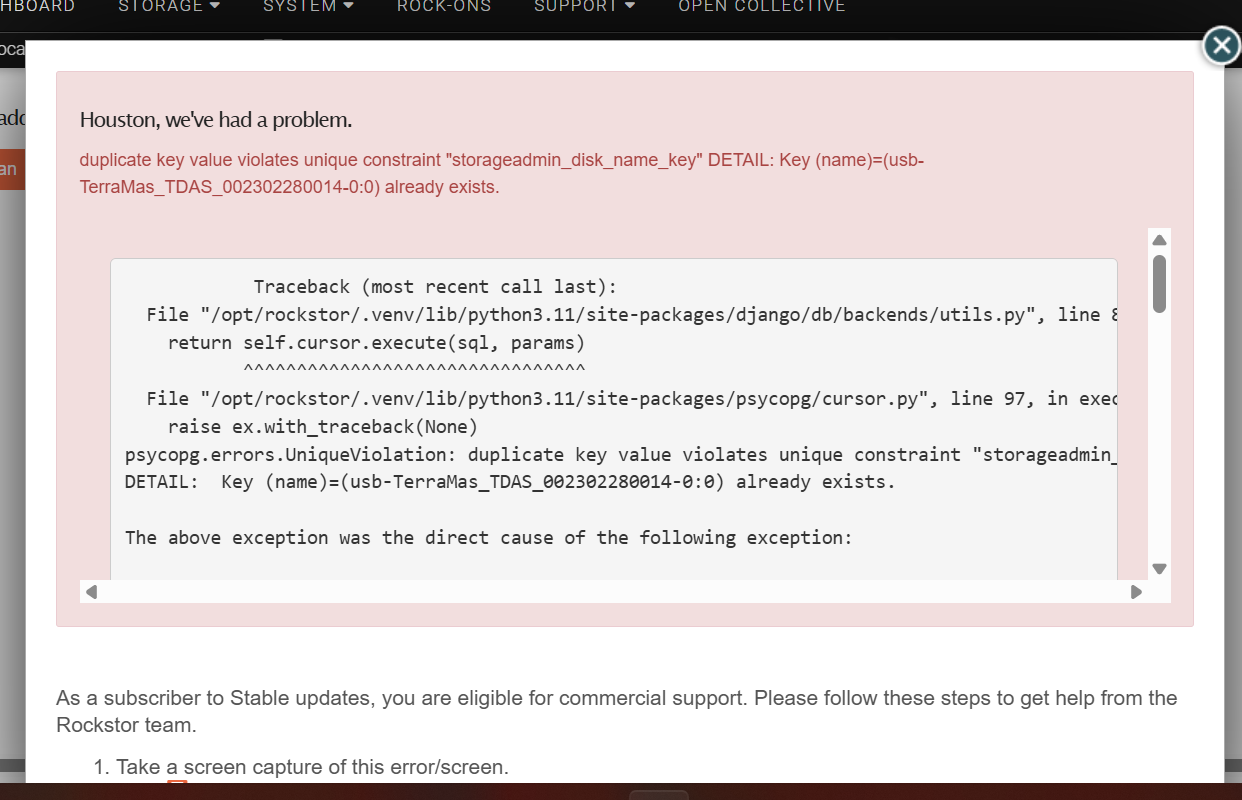
Error Traceback provided on the Web-UI

File “/opt/rockstor/.venv/lib/python3.11/site-packages/psycopg/cursor.py”, line 97, in execute
raise ex.with_traceback(None)
django.db.utils.IntegrityError: duplicate key value violates unique constraint “storageadmin_disk_name_key”
DETAIL: Key (name)=(usb-TerraMas_TDAS_002302280014-0:0) already exists.
[21/Jul/2026 19:30:02] ERROR [smart_manager.data_collector:1017] Failed to update disk state.. exception: 500 Server Error: Internal Server Error for url: http://127.0.0.1:8000/api/disks/scan

digging a bit more, it seems to be the usb enclosure. However, this exact setup has worked previously. Each drive does send its serial number, so they can be seen as unique.

How could this setup have worked previously?

1 Like

@thefunkaygibbon Hello again. Sorry to hear your unfortunate predicament here.

Re:

Yes that is strange - the behaviour of the device is both from its own firmware, and from the kernel drivers interaction with the devices hardware and firmware. It could be that the newer kernel (if this is the case) in the fresh install is now triggering this issue.

First off - given reassurance is good all-around I’d like to address:

You need to be logged in as the ‘root’ user, setup during install at this stage:

In order to be able to run btrfs commands. So give this a go, carefully, and you should be able to see the output from

btrfs fi show

If you are logged in as a normal use you can put sudo in front of the above and provide the ‘root’ users password when asked: i.e. ‘do’ the command as if you were the su (super user).

Could you clarify, if possibly, any Rockstor or Leap / OS version jumps you have enacted in this re-install? I.e. was the failed system a much older Rockstor instance.

The multi-drive USB enclosures have caused us a lot of trouble in the past. You say serials are still passed as unique though. Can you provide the output of the following command:

lsblk -P -p -o NAME,MODEL,SERIAL,SIZE,TRAN,VENDOR,HCTL,TYPE,FSTYPE,LABEL,UUID

But your reported non-unique error references the disk name!

It is what our internal scan runs, so should help with ‘seeing’ what the code is falling over at.
NOTE: This will expose on the forum the drive unique serials - a low risk but one you should be aware of.

Note that USB is not a preferred, and not recommended, for btrfs use. It’s basically as it has so many layers internal to it that can often be reset at inopportune moments and leave a drive set temporarily degraded (missing members). A potential weakness in most raid setups but notably so with btrfs. But for an enclosure where all drives go through the same interface there is less risk of ‘split brain’ Pool damage where drive members come and go on their own.

I’m currently working on our next release so may well not be available in a timely fashion here on the forum for follow-ups. But the above command outputs and requested info on “Built on …” OS & ‘rockstor’ version changes etc should help others here chip-in with how to get you up-and-running again.

The main think here is to only do what is required. Ideally a simply import of the prior Pool, from any one of its disk members is all that is required to have the Pool managed again by Rockstor. But if the enclosure is some-how changed in its behaviour and no-longer compatible that only affects the enclosures use with Rockstor. The drives can otherwise be connected and imported. You just have to be carefull to not do anything potentially distructive to the contents of the drive. I.e. create nothing new on this install until this anomaly is understood. This leaves open the inconvenient but doable option of using different hardware. Or a different OS version of Rockstor.

Hope that helps.

1 Like

I have managed to get this working with one of the drives as you have pointed out, so at least my NAS is running and can be used, but without the redundancy.

I thought I did use SUDO, but I could be mistaken. I am not too worried about that for now, the main reason I noted it was because I saw another post referencing that as a troubleshooting test, so I wanted as much info as I could for you to be able to help.

The two drives that are causing the issue are sdb and sdc. You can see here that the serial is different for each. I dont see any reference to “usb-TerraMas_TDAS_002302280014-0:0” at all, which the error is giving me as the breach of the key constraint

NAME=“/dev/sda” MODEL=“WDC WD10JPVX-60JC3T0” SERIAL=“WD-WXJ1A76346D1” SIZE=“931.5G” TRAN=“sata” VENDOR=“ATA     " HCTL=“1:0:0:0” TYPE=“disk” FSTYPE=“btrfs” LABEL=“SyncThing” UUID=“8be90362-4f15-43cb-a5f9-058119b0315b”
NAME=”/dev/sdb" MODEL=“HUH721212ALE601” SERIAL=“8DK6W76H” SIZE=“10.9T” TRAN=“usb” VENDOR=“TerraMas” HCTL=“2:0:0:0” TYPE=“disk” FSTYPE=“btrfs” LABEL=“Plexx” UUID=“b438c534-90d3-4349-a2ef-68b6bda88cd5”
NAME=“/dev/sdc” MODEL=“HUH721212ALE601” SERIAL=“8DK199ZH” SIZE=“10.9T” TRAN=“usb” VENDOR=“TerraMas” HCTL=“3:0:0:0” TYPE=“disk” FSTYPE=“btrfs” LABEL=“Plexx” UUID=“b438c534-90d3-4349-a2ef-68b6bda88cd5”
NAME=“/dev/nvme0n1” MODEL=“512GB SSD” SERIAL=“CN419BY2300088” SIZE=“476.9G” TRAN=“nvme” VENDOR=“” HCTL=“” TYPE=“disk” FSTYPE=“” LABEL=“” UUID=“”
NAME=“/dev/nvme0n1p1” MODEL=“” SERIAL=“” SIZE=“2M” TRAN=“nvme” VENDOR=“” HCTL=“” TYPE=“part” FSTYPE=“” LABEL=“” UUID=“”
NAME=“/dev/nvme0n1p2” MODEL=“” SERIAL=“” SIZE=“64M” TRAN=“nvme” VENDOR=“” HCTL=“” TYPE=“part” FSTYPE=“vfat” LABEL=“EFI” UUID=“5358-3D03”
NAME=“/dev/nvme0n1p3” MODEL=“” SERIAL=“” SIZE=“2G” TRAN=“nvme” VENDOR=“” HCTL=“” TYPE=“part” FSTYPE=“swap” LABEL=“SWAP” UUID=“e59daf62-280d-44cc-a4f8-2cf1249aca14”
NAME=“/dev/nvme0n1p4” MODEL=“” SERIAL=“” SIZE=“474.9G” TRAN=“nvme” VENDOR=“” HCTL=“” TYPE=“part” FSTYPE=“btrfs” LABEL=“ROOT” UUID=“cbfce5f5-49d8-49b1-83ac-854176beab2b”

@thefunkaygibbon Thanks for the info; that does, as you say, look entirely normal and not like what we have seen provoking non-unique DB table entries in the past (the no serial bit).
Re:

The comes from udev constructing unique references that we depend upon. I you look at the output of:

ls -la /dev/disk/by-id/

Incidentally, our no-unique-serial issue with some enclosures rendered udev unable to create these unique references (file links to othewise dynamic devs (the /dev/sda type)) in the first play.

These names, among a few others, are constructed from elements that udev retrieves. I.e. the output from the following shows the info it uses to generate these names:

udevadm info --name=/dev/sdb
udevadm info --name=/dev/sdc

the outputs from these commands may also help folks here understand what is failing.
Note the formatting change I edited into your last post will help with readability on the output of these commands when pasted into the forum.

Also could you provide the install method used - i.e. what installer did you end up re-installing with - this is important to know the “Built-on” bit and you didn’t mention the version of Rockstor that you previously had working OK. All contextual to trying to understand what has changed to make this hardware setup no longer work as it did before.

Hope this helps.

1 Like

@thefunkaygibbon IMPORTANT Re:

If I understand correctly, you have attached either sdb or sdc alone, when they were previously part of say a raid1. As such you cannot re-attach the now outdated Pool member as you will have created a split brain situation. I.e. one Pool member, once mounted alone in degraded form must not be re-paired with a now outdated prior member. There can be issues in the Pool repairing itself by updating the temporarily lost member; so for the sake of data safety do take care to avoid re-attaching the prior member.

Just wanted to point this out: known as split brain as there are then 2 members that each think they are a pair - only one is from the future; from the others perspective. We need not take any unnecessary risks - at least if there is any doubt as to the backup integrity of the data concerned here. The split-brain problem mainly pertains to when the older member also receives unique writes - and so is no longer part of the ‘future’ drives past :slight_smile: .

Cheers.

The results of

ls -la /dev/disk/by-id/

Shows:

lrwxrwxrwx. 1 root root   9 Jul 22 08:52 ata-HUH721212ALE601_8DK199ZH -> ../../sdc
lrwxrwxrwx. 1 root root   9 Jul 22 08:36 ata-HUH721212ALE601_8DK6W76H -> ../../sdb

Which again seems OK to me

I honestly don’t recall the version that I was using previously, I would never have reinstalled if it wasn’t for the crash. The reinstall was via a bootable USB using the latest iso available from the Rockstor downloads page