Brief description of the problem
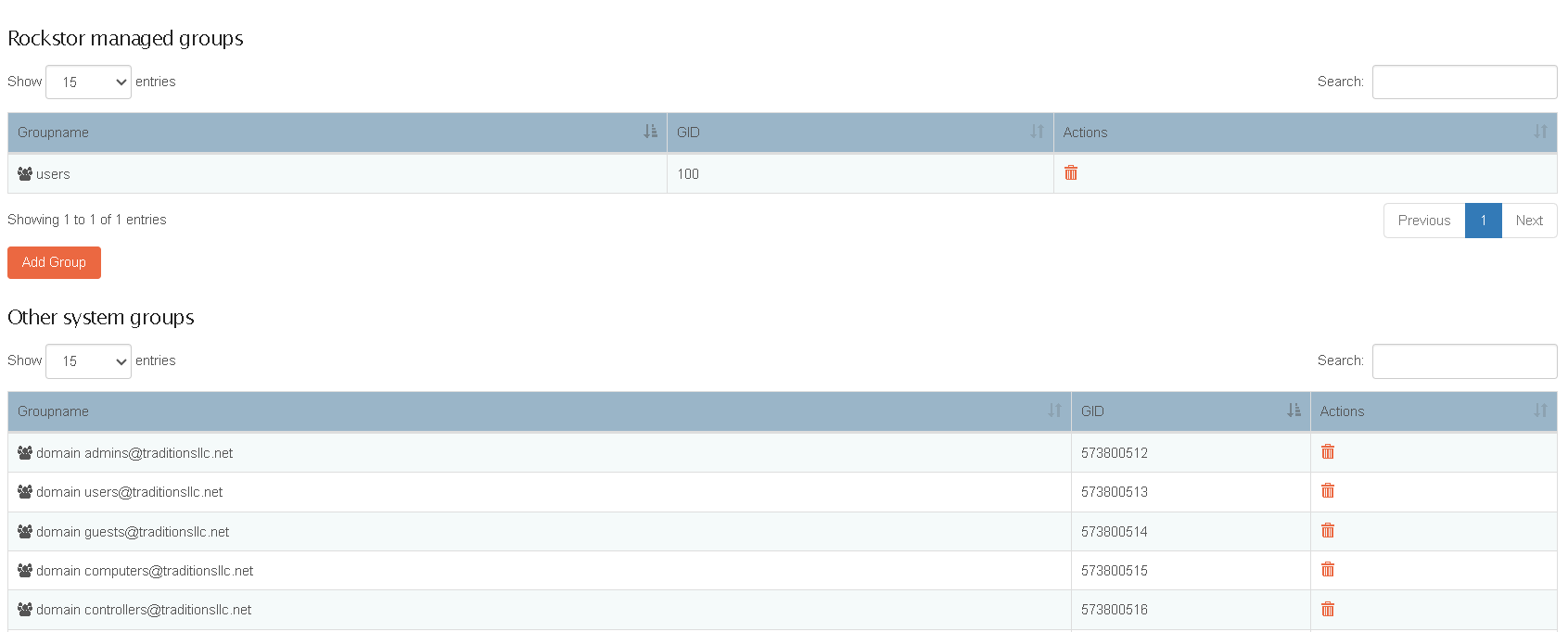
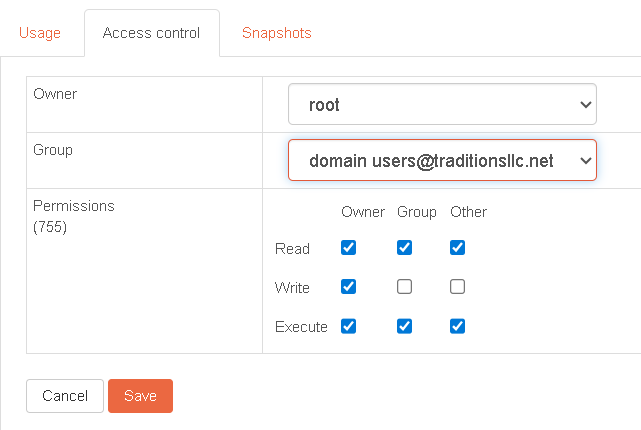
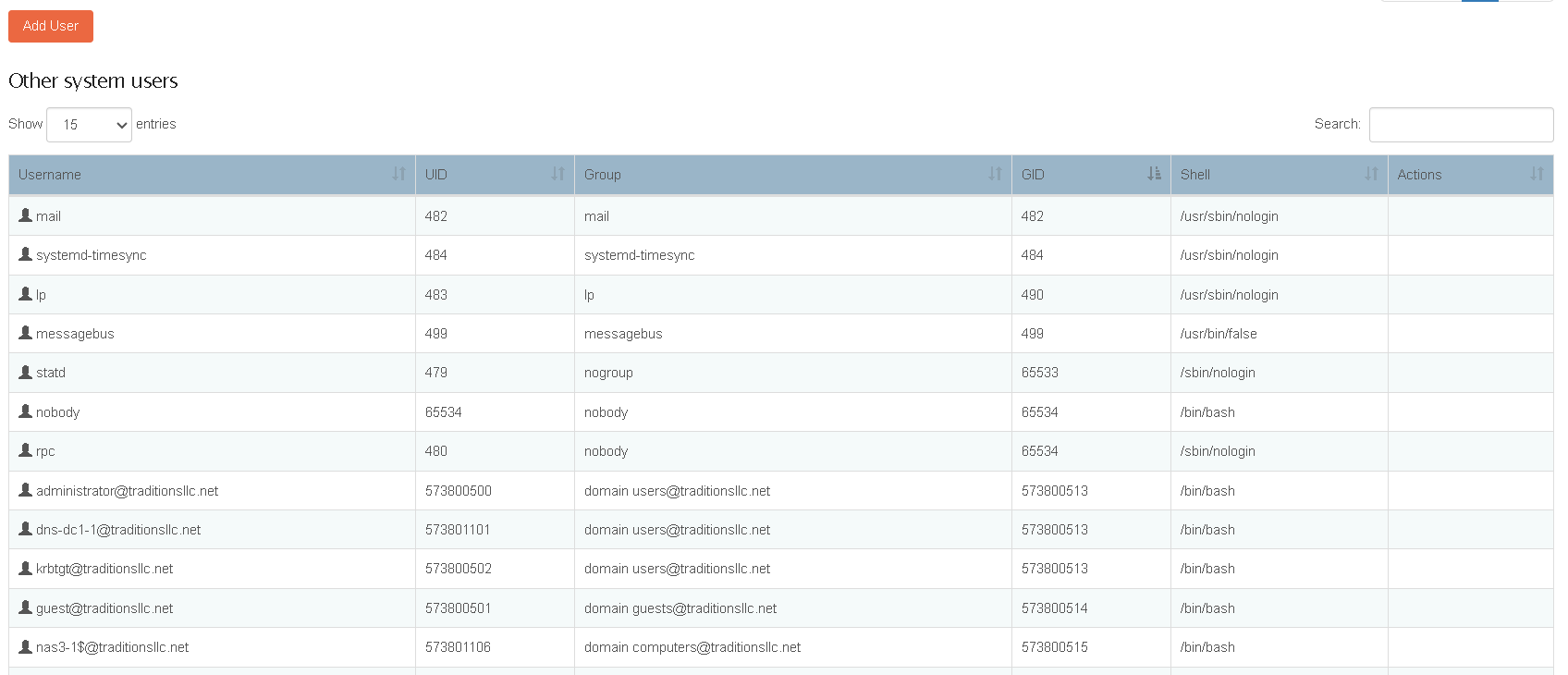
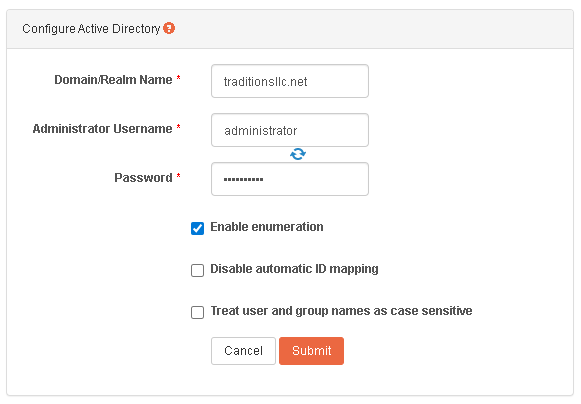
After a clean install of Rockstor 5.1.0-0, configuring the NTP, SAMBA Workgourp and Active Directory; successfully starting the services in that order; NAS2-1 shows up as COMPUTER in Active Directory, Active Directory Groups are enumerated, while Active Directory Users are NOT enumerated.
Detailed step by step instructions to reproduce the problem
The brief description includes the steps for reproduction. The environment is as follows:
Samba Active Directory Controller: XCP-ng VM Debian 12 Samba BIND9 v4.23.2 built from source
Rockstor: v5.1.0-0 on XCP-ng VM with passthrough HBA adapters built from generic AMD64 ISO
NAS2-1:/etc/sssd # systemctl status sssd
● sssd.service - System Security Services Daemon
Loaded: loaded (/usr/lib/systemd/system/sssd.service; enabled; preset: disabled)
Active: active (running) since Tue 2026-04-07 13:06:52 MST; 23min ago
Process: 30611 ExecStartPre=/bin/chown -f -R -H root:sssd /etc/sssd (code=exited, status=0/SUCCESS)
Process: 30613 ExecStartPre=/bin/chmod -f -R g+r /etc/sssd (code=exited, status=0/SUCCESS)
Process: 30615 ExecStartPre=/bin/chmod -f g+x /etc/sssd (code=exited, status=0/SUCCESS)
Process: 30617 ExecStartPre=/bin/chmod -f g+x /etc/sssd/conf.d (code=exited, status=0/SUCCESS)
Process: 30619 ExecStartPre=/bin/chmod -f g+x /etc/sssd/pki (code=exited, status=1/FAILURE)
Process: 30621 ExecStartPre=/bin/sh -c /bin/chown -f -h sssd:sssd /var/lib/sss/db/.ldb (code=exited, status=0/SUCCESS)
Process: 30623 ExecStartPre=/bin/chown -f -R -h sssd:sssd /var/lib/sss/gpo_cache (code=exited, status=0/SUCCESS)
Process: 30625 ExecStartPre=/bin/sh -c /bin/chown -f -h sssd:sssd /var/log/sssd/.log* (code=exited, status=0/SUCCESS)
Main PID: 30627 (sssd)
Tasks: 6 (limit: 4915)
CPU: 279ms
CGroup: /system.slice/sssd.service
├─30627 /usr/sbin/sssd -i --logger=files
├─30628 /usr/lib/sssd/sssd_be --domain traditionsllc.net --logger=files
├─30630 /usr/lib/sssd/sssd_nss --logger=files
├─30631 /usr/lib/sssd/sssd_pam --logger=files
├─30632 /usr/lib/sssd/sssd_ifp --logger=files
└─30633 /usr/lib/sssd/sssd_pac --logger=files
Apr 07 13:06:51 NAS2-1 systemd[1]: Starting System Security Services Daemon…
Apr 07 13:06:51 NAS2-1 sssd[30627]: Starting up
Apr 07 13:06:51 NAS2-1 sssd_be[30628]: Starting up
Apr 07 13:06:51 NAS2-1 sssd_ifp[30632]: Starting up
Apr 07 13:06:51 NAS2-1 sssd_nss[30630]: Starting up
Apr 07 13:06:51 NAS2-1 sssd_pam[30631]: Starting up
Apr 07 13:06:52 NAS2-1 sssd_pac[30633]: Starting up
Apr 07 13:06:52 NAS2-1 systemd[1]: Started System Security Services Daemon.
Apr 07 13:22:08 NAS2-1 sssd_nss[30630]: Enumeration requested but not enabled[1]
[1] shows up after executing the following:
NAS2-1:/etc/sssd # getent passwd
root:x:0:0:root:/root:/bin/bash
messagebus:x:499:499:User for D-Bus:/run/dbus:/usr/bin/false
systemd-timesync:x:484:484:systemd Time Synchronization:/:/usr/sbin/nologin
daemon:x:2:2:Daemon:/sbin:/usr/sbin/nologin
lp:x:483:490:Printing daemon:/var/spool/lpd:/usr/sbin/nologin
mail:x:482:482:Mailer daemon:/var/spool/clientmqueue:/usr/sbin/nologin
nobody:x:65534:65534:nobody:/var/lib/nobody:/bin/bash
upsd:x:481:481:UPS daemon:/var/lib/empty:/usr/sbin/nologin
rpc:x:480:65534:user for rpcbind:/var/lib/empty:/sbin/nologin
statd:x:479:65533:NFS statd daemon:/var/lib/nfs:/sbin/nologin
sshd:x:478:478:SSH daemon:/var/lib/sshd:/usr/sbin/nologin
dockremap:x:477:477:docker --userns-remap=default:/:/usr/sbin/nologin
chrony:x:476:476:Chrony Daemon:/var/lib/chrony:/usr/sbin/nologin
pesign:x:475:479:PE-COFF signing daemon:/var/lib/pesign:/bin/false
ntp:x:74:475:NTP daemon:/var/lib/ntp:/bin/false
postgres:x:474:474:PostgreSQL Server:/var/lib/pgsql:/bin/bash
postfix:x:51:51:Postfix Daemon:/var/spool/postfix:/usr/sbin/nologin
avahi:x:473:473:User for Avahi:/run/avahi-daemon:/usr/sbin/nologin
nginx:x:472:472:User for nginx:/var/lib/nginx:/usr/sbin/nologin
shellinabox:x:471:471:user for shellinabox:/var/lib/shellinabox:/bin/false
polkitd:x:470:470:User for polkitd:/var/lib/polkit:/usr/sbin/nologin
at:x:25:25:Batch jobs daemon:/var/spool/atjobs:/usr/sbin/nologin
sssd:x:469:468:System Security Services Daemon:/run/sssd:/sbin/nologin
nasntadmin:x:1000:100::/home/nasntadmin:/bin/bash
NAS2-1:/etc/sssd # wbinfo -p
Ping to winbindd succeeded
NAS2-1:/etc/sssd # wbinfo -D traditionsllc.net
Name : TRADITIONSLLC
Alt_Name : traditionsllc.net
SID : S-1-5-21-3387211117-2021684950-4115634017
Active Directory : Yes
Native : Yes
Primary : Yes
NAS2-1:/etc/sssd # wbinfo -K administrator
Enter administrator’s password:
plaintext kerberos password authentication for [administrator] succeeded (requesting cctype: FILE)
credentials were put in: FILE:/tmp/krb5cc_0
NAS2-1:/etc/sssd # wbinfo -u
TRADITIONSLLC\guest
TRADITIONSLLC\administrator
TRADITIONSLLC\dns-dc1-1
TRADITIONSLLC\krbtgt
NAS2-1:/etc/sssd # id administrator
id: ‘administrator’: no such user
NAS2-1:/etc/sssd # id administrator@traditionsllc.net
uid=573800500(administrator@traditionsllc.net) gid=573800513(domain users@traditionsllc.net) groups=573800513(domain users@traditionsllc.net),573800518(schema admins@traditionsllc.net),573800572(denied rodc password replication group@traditionsllc.net),573800519(enterprise admins@traditionsllc.net),573800512(domain admins@traditionsllc.net),573800520(group policy creator owners@traditionsllc.net)
NAS2-1:/etc/sssd # cat /etc/sssd/sssd.conf
…
[sssd]
services = nss, pam, ifp
domains = traditionsllc.net
config_file_version = 2
…
[domain/traditionsllc.net]
default_shell = /bin/bash
krb5_store_password_if_offline = True
cache_credentials = True
krb5_realm = TRADITIONSLLC.NET
realmd_tags = manages-system joined-with-samba
id_provider = ad
fallback_homedir = /home/%u@%d
ad_domain = traditionsllc.net
use_fully_qualified_names = true
ldap_id_mapping = True
access_provider = ad
enumerate = True
NAS2-1:/etc/sssd # cat /etc/nsswitch.conf
…
passwd: compat sss
group: compat sss
shadow: compat sss
…
NAS2-1:/etc/sssd # cat /var/log/sssd/sssd_traditionsllc.net.log | grep ‘2026-04-07 12:39:’
- (2026-04-07 12:39:44): [be[traditionsllc.net]] [sbus_dispatch] (0x4000): Dispatching.
- (2026-04-07 12:39:44): [be[traditionsllc.net]] [sbus_method_handler] (0x2000): Received D-Bus method sssd.dataprovider.getAccountInfo on /sssd from sssd.nss
- (2026-04-07 12:39:44): [be[traditionsllc.net]] [sbus_senders_lookup] (0x2000): Looking for identity of sender [sssd.nss]
- (2026-04-07 12:39:44): [be[traditionsllc.net]] [dp_get_account_info_send] (0x0200): Got request for [0x1][BE_REQ_USER][name=administrator@traditionsllc.net]
- (2026-04-07 12:39:44): [be[traditionsllc.net]] [dp_attach_req] (0x0400): [RID#7] DP Request [Account #7]: REQ_TRACE: New request. [sssd.nss CID #18] Flags [0x0001].
- (2026-04-07 12:39:44): [be[traditionsllc.net]] [dp_attach_req] (0x0400): [RID#7] Number of active DP request: 1
- (2026-04-07 12:39:44): [be[traditionsllc.net]] [sss_domain_get_state] (0x1000): [RID#7] Domain traditionsllc.net is Active
- (2026-04-07 12:39:44): [be[traditionsllc.net]] [sss_domain_get_state] (0x1000): [RID#7] Domain traditionsllc.net is Active
- (2026-04-07 12:39:44): [be[traditionsllc.net]] [sdap_id_op_connect_step] (0x4000): [RID#7] reusing cached connection
- (2026-04-07 12:39:44): [be[traditionsllc.net]] [sdap_id_conn_data_not_idle] (0x4000): [RID#7] Marking connection as not idle
- (2026-04-07 12:39:44): [be[traditionsllc.net]] [sdap_search_user_next_base] (0x0400): [RID#7] Searching for users with base [DC=traditionsllc,DC=net]
- (2026-04-07 12:39:44): [be[traditionsllc.net]] [sdap_get_generic_ext_step] (0x0400): [RID#7] calling ldap_search_ext with [(&(sAMAccountName=administrator)(objectclass=user)(sAMAccountName=)(objectSID=))][DC=traditionsllc,DC=net].
- (2026-04-07 12:39:44): [be[traditionsllc.net]] [sdap_get_generic_ext_step] (0x1000): [RID#7] Requesting attrs: [objectClass]
- (2026-04-07 12:39:44): [be[traditionsllc.net]] [sdap_get_generic_ext_step] (0x1000): [RID#7] Requesting attrs: [sAMAccountName]
- (2026-04-07 12:39:44): [be[traditionsllc.net]] [sdap_get_generic_ext_step] (0x1000): [RID#7] Requesting attrs: [unixUserPassword]
- (2026-04-07 12:39:44): [be[traditionsllc.net]] [sdap_get_generic_ext_step] (0x1000): [RID#7] Requesting attrs: [uidNumber]
- (2026-04-07 12:39:44): [be[traditionsllc.net]] [sdap_get_generic_ext_step] (0x1000): [RID#7] Requesting attrs: [gidNumber]
- (2026-04-07 12:39:44): [be[traditionsllc.net]] [sdap_get_generic_ext_step] (0x1000): [RID#7] Requesting attrs: [gecos]
- (2026-04-07 12:39:44): [be[traditionsllc.net]] [sdap_get_generic_ext_step] (0x1000): [RID#7] Requesting attrs: [unixHomeDirectory]
- (2026-04-07 12:39:44): [be[traditionsllc.net]] [sdap_get_generic_ext_step] (0x1000): [RID#7] Requesting attrs: [loginShell]
- (2026-04-07 12:39:44): [be[traditionsllc.net]] [sdap_get_generic_ext_step] (0x1000): [RID#7] Requesting attrs: [userPrincipalName]
- (2026-04-07 12:39:44): [be[traditionsllc.net]] [sdap_get_generic_ext_step] (0x1000): [RID#7] Requesting attrs: [name]
- (2026-04-07 12:39:44): [be[traditionsllc.net]] [sdap_get_generic_ext_step] (0x1000): [RID#7] Requesting attrs: [memberOf]
- (2026-04-07 12:39:44): [be[traditionsllc.net]] [sdap_get_generic_ext_step] (0x1000): [RID#7] Requesting attrs: [objectGUID]
- (2026-04-07 12:39:44): [be[traditionsllc.net]] [sdap_get_generic_ext_step] (0x1000): [RID#7] Requesting attrs: [objectSID]
- (2026-04-07 12:39:44): [be[traditionsllc.net]] [sdap_get_generic_ext_step] (0x1000): [RID#7] Requesting attrs: [primaryGroupID]
- (2026-04-07 12:39:44): [be[traditionsllc.net]] [sdap_get_generic_ext_step] (0x1000): [RID#7] Requesting attrs: [whenChanged]
- (2026-04-07 12:39:44): [be[traditionsllc.net]] [sdap_get_generic_ext_step] (0x1000): [RID#7] Requesting attrs: [uSNChanged]
- (2026-04-07 12:39:44): [be[traditionsllc.net]] [sdap_get_generic_ext_step] (0x1000): [RID#7] Requesting attrs: [accountExpires]
- (2026-04-07 12:39:44): [be[traditionsllc.net]] [sdap_get_generic_ext_step] (0x1000): [RID#7] Requesting attrs: [userAccountControl]
- (2026-04-07 12:39:44): [be[traditionsllc.net]] [sdap_get_generic_ext_step] (0x1000): [RID#7] Requesting attrs: [userCertificate;binary]
- (2026-04-07 12:39:44): [be[traditionsllc.net]] [sdap_get_generic_ext_step] (0x1000): [RID#7] Requesting attrs: [mail]
- (2026-04-07 12:39:44): [be[traditionsllc.net]] [sdap_get_generic_ext_step] (0x1000): [RID#7] Requesting attrs: [sAMAccountName]
- (2026-04-07 12:39:44): [be[traditionsllc.net]] [sdap_get_generic_ext_step] (0x1000): [RID#7] Requesting attrs: [altSecurityIdentities]
- (2026-04-07 12:39:44): [be[traditionsllc.net]] [sdap_get_generic_ext_step] (0x2000): [RID#7] ldap_search_ext called, msgid = 7
- (2026-04-07 12:39:44): [be[traditionsllc.net]] [sdap_op_add] (0x2000): [RID#7] New operation 7 timeout 6
- (2026-04-07 12:39:44): [be[traditionsllc.net]] [sdap_process_result] (0x2000): Trace: sh[0x55b9a29c9030], connected[1], ops[0x55b9a29cf7f0], ldap[0x55b9a2955830]
- (2026-04-07 12:39:44): [be[traditionsllc.net]] [sdap_process_message] (0x4000): [RID#7] Message type: [LDAP_RES_SEARCH_ENTRY]
- (2026-04-07 12:39:44): [be[traditionsllc.net]] [sdap_parse_entry] (0x1000): [RID#7] OriginalDN: [CN=Administrator,CN=Users,DC=traditionsllc,DC=net].
- (2026-04-07 12:39:44): [be[traditionsllc.net]] [sdap_parse_range] (0x2000): [RID#7] No sub-attributes for [objectClass]
- (2026-04-07 12:39:44): [be[traditionsllc.net]] [sdap_parse_range] (0x2000): [RID#7] No sub-attributes for [name]
- (2026-04-07 12:39:44): [be[traditionsllc.net]] [sdap_parse_range] (0x2000): [RID#7] No sub-attributes for [objectGUID]
- (2026-04-07 12:39:44): [be[traditionsllc.net]] [sdap_parse_range] (0x2000): [RID#7] No sub-attributes for [userAccountControl]
- (2026-04-07 12:39:44): [be[traditionsllc.net]] [sdap_parse_range] (0x2000): [RID#7] No sub-attributes for [primaryGroupID]
- (2026-04-07 12:39:44): [be[traditionsllc.net]] [sdap_parse_range] (0x2000): [RID#7] No sub-attributes for [objectSid]
- (2026-04-07 12:39:44): [be[traditionsllc.net]] [sdap_parse_range] (0x2000): [RID#7] No sub-attributes for [accountExpires]
- (2026-04-07 12:39:44): [be[traditionsllc.net]] [sdap_parse_range] (0x2000): [RID#7] No sub-attributes for [sAMAccountName]
- (2026-04-07 12:39:44): [be[traditionsllc.net]] [sdap_parse_range] (0x2000): [RID#7] No sub-attributes for [memberOf]
- (2026-04-07 12:39:44): [be[traditionsllc.net]] [sdap_parse_range] (0x2000): [RID#7] No sub-attributes for [whenChanged]
- (2026-04-07 12:39:44): [be[traditionsllc.net]] [sdap_parse_range] (0x2000): [RID#7] No sub-attributes for [uSNChanged]
- (2026-04-07 12:39:44): [be[traditionsllc.net]] [sdap_process_result] (0x2000): Trace: sh[0x55b9a29c9030], connected[1], ops[0x55b9a29cf7f0], ldap[0x55b9a2955830]
- (2026-04-07 12:39:44): [be[traditionsllc.net]] [sdap_process_message] (0x4000): [RID#7] Message type: [LDAP_RES_SEARCH_REFERENCE]
- (2026-04-07 12:39:44): [be[traditionsllc.net]] [sdap_get_generic_ext_add_references] (0x1000): [RID#7] Additional References: ldap://traditionsllc.net/CN=Configuration,DC=traditionsllc,DC=net
- (2026-04-07 12:39:44): [be[traditionsllc.net]] [sdap_process_result] (0x2000): Trace: sh[0x55b9a29c9030], connected[1], ops[0x55b9a29cf7f0], ldap[0x55b9a2955830]
- (2026-04-07 12:39:44): [be[traditionsllc.net]] [sdap_process_message] (0x4000): [RID#7] Message type: [LDAP_RES_SEARCH_REFERENCE]
- (2026-04-07 12:39:44): [be[traditionsllc.net]] [sdap_get_generic_ext_add_references] (0x1000): [RID#7] Additional References: ldap://traditionsllc.net/DC=DomainDnsZones,DC=traditionsllc,DC=net
- (2026-04-07 12:39:44): [be[traditionsllc.net]] [sdap_process_result] (0x2000): Trace: sh[0x55b9a29c9030], connected[1], ops[0x55b9a29cf7f0], ldap[0x55b9a2955830]
- (2026-04-07 12:39:44): [be[traditionsllc.net]] [sdap_process_message] (0x4000): [RID#7] Message type: [LDAP_RES_SEARCH_REFERENCE]
- (2026-04-07 12:39:44): [be[traditionsllc.net]] [sdap_get_generic_ext_add_references] (0x1000): [RID#7] Additional References: ldap://traditionsllc.net/DC=ForestDnsZones,DC=traditionsllc,DC=net
- (2026-04-07 12:39:44): [be[traditionsllc.net]] [sdap_process_result] (0x2000): Trace: sh[0x55b9a29c9030], connected[1], ops[0x55b9a29cf7f0], ldap[0x55b9a2955830]
- (2026-04-07 12:39:44): [be[traditionsllc.net]] [sdap_process_message] (0x4000): [RID#7] Message type: [LDAP_RES_SEARCH_RESULT]
- (2026-04-07 12:39:44): [be[traditionsllc.net]] [sdap_get_generic_op_finished] (0x0400): [RID#7] Search result: Success(0), no errmsg set
- (2026-04-07 12:39:44): [be[traditionsllc.net]] [sdap_op_destructor] (0x2000): [RID#7] Operation 7 finished
- (2026-04-07 12:39:44): [be[traditionsllc.net]] [generic_ext_search_handler] (0x4000): [RID#7] Request included referrals which were ignored.
- (2026-04-07 12:39:44): [be[traditionsllc.net]] [sdap_search_user_process] (0x0400): [RID#7] Search for users, returned 1 results.
- (2026-04-07 12:39:44): [be[traditionsllc.net]] [sdap_search_user_process] (0x2000): [RID#7] Retrieved total 1 users
- (2026-04-07 12:39:44): [be[traditionsllc.net]] [sdap_save_user] (0x0400): [RID#7] Save user
- (2026-04-07 12:39:44): [be[traditionsllc.net]] [sss_domain_get_state] (0x1000): [RID#7] Domain traditionsllc.net is Active
- (2026-04-07 12:39:44): [be[traditionsllc.net]] [sdap_get_primary_name] (0x0400): [RID#7] Processing object Administrator
- (2026-04-07 12:39:44): [be[traditionsllc.net]] [sdap_save_user] (0x0400): [RID#7] Processing user Administrator@traditionsllc.net
- (2026-04-07 12:39:44): [be[traditionsllc.net]] [sdap_save_user] (0x0400): [RID#7] Storing Canonical UPN Administrator@TRADITIONSLLC.NET for user Administrator@traditionsllc.net
- (2026-04-07 12:39:44): [be[traditionsllc.net]] [sdap_save_user] (0x1000): [RID#7] Mapping user [Administrator@traditionsllc.net] objectSID [S-1-5-21-3387211117-2021684950-4115634017-500] to unix ID
- (2026-04-07 12:39:44): [be[traditionsllc.net]] [sdap_save_user] (0x2000): [RID#7] Adding originalDN [CN=Administrator,CN=Users,DC=traditionsllc,DC=net] to attributes of [Administrator@traditionsllc.net].
- (2026-04-07 12:39:44): [be[traditionsllc.net]] [sdap_save_user] (0x0400): [RID#7] Adding original memberOf attributes to [Administrator@traditionsllc.net].
- (2026-04-07 12:39:44): [be[traditionsllc.net]] [sdap_attrs_add_ldap_attr] (0x2000): [RID#7] Adding original mod-Timestamp [20260407061222.0Z] to attributes of [Administrator@traditionsllc.net].
- (2026-04-07 12:39:44): [be[traditionsllc.net]] [sdap_save_user] (0x0400): [RID#7] User principal is not available for [Administrator@traditionsllc.net].
- (2026-04-07 12:39:44): [be[traditionsllc.net]] [sdap_attrs_add_ldap_attr] (0x2000): [RID#7] shadowLastChange is not available for [Administrator@traditionsllc.net].
- (2026-04-07 12:39:44): [be[traditionsllc.net]] [sdap_attrs_add_ldap_attr] (0x2000): [RID#7] shadowMin is not available for [Administrator@traditionsllc.net].
- (2026-04-07 12:39:44): [be[traditionsllc.net]] [sdap_attrs_add_ldap_attr] (0x2000): [RID#7] shadowMax is not available for [Administrator@traditionsllc.net].
- (2026-04-07 12:39:44): [be[traditionsllc.net]] [sdap_attrs_add_ldap_attr] (0x2000): [RID#7] shadowWarning is not available for [Administrator@traditionsllc.net].
- (2026-04-07 12:39:44): [be[traditionsllc.net]] [sdap_attrs_add_ldap_attr] (0x2000): [RID#7] shadowInactive is not available for [Administrator@traditionsllc.net].
- (2026-04-07 12:39:44): [be[traditionsllc.net]] [sdap_attrs_add_ldap_attr] (0x2000): [RID#7] shadowExpire is not available for [Administrator@traditionsllc.net].
- (2026-04-07 12:39:44): [be[traditionsllc.net]] [sdap_attrs_add_ldap_attr] (0x2000): [RID#7] shadowFlag is not available for [Administrator@traditionsllc.net].
- (2026-04-07 12:39:44): [be[traditionsllc.net]] [sdap_attrs_add_ldap_attr] (0x2000): [RID#7] krbLastPwdChange is not available for [Administrator@traditionsllc.net].
- (2026-04-07 12:39:44): [be[traditionsllc.net]] [sdap_attrs_add_ldap_attr] (0x2000): [RID#7] krbPasswordExpiration is not available for [Administrator@traditionsllc.net].
- (2026-04-07 12:39:44): [be[traditionsllc.net]] [sdap_attrs_add_ldap_attr] (0x2000): [RID#7] pwdAttribute is not available for [Administrator@traditionsllc.net].
- (2026-04-07 12:39:44): [be[traditionsllc.net]] [sdap_attrs_add_ldap_attr] (0x2000): [RID#7] authorizedService is not available for [Administrator@traditionsllc.net].
- (2026-04-07 12:39:44): [be[traditionsllc.net]] [sdap_attrs_add_ldap_attr] (0x2000): [RID#7] Adding adAccountExpires [9223372036854775807] to attributes of [Administrator@traditionsllc.net].
- (2026-04-07 12:39:44): [be[traditionsllc.net]] [sdap_attrs_add_ldap_attr] (0x2000): [RID#7] Adding adUserAccountControl [512] to attributes of [Administrator@traditionsllc.net].
- (2026-04-07 12:39:44): [be[traditionsllc.net]] [sdap_attrs_add_ldap_attr] (0x2000): [RID#7] nsAccountLock is not available for [Administrator@traditionsllc.net].
- (2026-04-07 12:39:44): [be[traditionsllc.net]] [sdap_attrs_add_ldap_attr] (0x2000): [RID#7] authorizedHost is not available for [Administrator@traditionsllc.net].
- (2026-04-07 12:39:44): [be[traditionsllc.net]] [sdap_attrs_add_ldap_attr] (0x2000): [RID#7] authorizedRHost is not available for [Administrator@traditionsllc.net].
- (2026-04-07 12:39:44): [be[traditionsllc.net]] [sdap_attrs_add_ldap_attr] (0x2000): [RID#7] ndsLoginDisabled is not available for [Administrator@traditionsllc.net].
- (2026-04-07 12:39:44): [be[traditionsllc.net]] [sdap_attrs_add_ldap_attr] (0x2000): [RID#7] ndsLoginExpirationTime is not available for [Administrator@traditionsllc.net].
- (2026-04-07 12:39:44): [be[traditionsllc.net]] [sdap_attrs_add_ldap_attr] (0x2000): [RID#7] ndsLoginAllowedTimeMap is not available for [Administrator@traditionsllc.net].
- (2026-04-07 12:39:44): [be[traditionsllc.net]] [sdap_attrs_add_ldap_attr] (0x2000): [RID#7] sshPublicKey is not available for [Administrator@traditionsllc.net].
- (2026-04-07 12:39:44): [be[traditionsllc.net]] [sdap_attrs_add_ldap_attr] (0x2000): [RID#7] authType is not available for [Administrator@traditionsllc.net].
- (2026-04-07 12:39:44): [be[traditionsllc.net]] [sdap_attrs_add_ldap_attr] (0x2000): [RID#7] userCertificate is not available for [Administrator@traditionsllc.net].
- (2026-04-07 12:39:44): [be[traditionsllc.net]] [sdap_attrs_add_ldap_attr] (0x2000): [RID#7] mail is not available for [Administrator@traditionsllc.net].
- (2026-04-07 12:39:44): [be[traditionsllc.net]] [sdap_attrs_add_ldap_attr] (0x2000): [RID#7] Adding adSAMAccountName [Administrator] to attributes of [Administrator@traditionsllc.net].
- (2026-04-07 12:39:44): [be[traditionsllc.net]] [sdap_attrs_add_ldap_attr] (0x2000): [RID#7] userPasskey is not available for [Administrator@traditionsllc.net].
- (2026-04-07 12:39:44): [be[traditionsllc.net]] [sysdb_attrs_get_aliases] (0x2000): [RID#7] Domain is case-insensitive; will add lowercased aliases
- (2026-04-07 12:39:44): [be[traditionsllc.net]] [sdap_save_user] (0x0400): [RID#7] Storing info for user Administrator@traditionsllc.net
- (2026-04-07 12:39:44): [be[traditionsllc.net]] [sysdb_set_entry_attr] (0x0200): [RID#7] Entry [name=Administrator@traditionsllc.net,cn=users,cn=traditionsllc.net,cn=sysdb] has set [ts_cache] attrs.
- (2026-04-07 12:39:44): [be[traditionsllc.net]] [sysdb_remove_attrs] (0x2000): [RID#7] Removing attribute [userPassword] from [Administrator@traditionsllc.net]
- (2026-04-07 12:39:44): [be[traditionsllc.net]] [sysdb_remove_attrs] (0x2000): [RID#7] Removing attribute [homeDirectory] from [Administrator@traditionsllc.net]
- (2026-04-07 12:39:44): [be[traditionsllc.net]] [sysdb_remove_attrs] (0x2000): [RID#7] Removing attribute [loginShell] from [Administrator@traditionsllc.net]
- (2026-04-07 12:39:44): [be[traditionsllc.net]] [sysdb_remove_attrs] (0x2000): [RID#7] Removing attribute [userPrincipalName] from [Administrator@traditionsllc.net]
- (2026-04-07 12:39:44): [be[traditionsllc.net]] [sysdb_remove_attrs] (0x2000): [RID#7] Removing attribute [userCertificate] from [Administrator@traditionsllc.net]
- (2026-04-07 12:39:44): [be[traditionsllc.net]] [sysdb_remove_attrs] (0x2000): [RID#7] Removing attribute [mail] from [Administrator@traditionsllc.net]
- (2026-04-07 12:39:44): [be[traditionsllc.net]] [sysdb_remove_attrs] (0x2000): [RID#7] Removing attribute [userPasskey] from [Administrator@traditionsllc.net]
- (2026-04-07 12:39:44): [be[traditionsllc.net]] [sysdb_store_user] (0x0400): [RID#7] User “Administrator@traditionsllc.net” has been stored
- (2026-04-07 12:39:44): [be[traditionsllc.net]] [sdap_save_users] (0x4000): [RID#7] User 0 processed!
- (2026-04-07 12:39:44): [be[traditionsllc.net]] [sdap_get_users_done] (0x4000): [RID#7] Saving 1 Users - Done
- (2026-04-07 12:39:44): [be[traditionsllc.net]] [sdap_id_op_done] (0x4000): [RID#7] releasing operation connection
- (2026-04-07 12:39:44): [be[traditionsllc.net]] [sdap_id_conn_data_idle] (0x4000): [RID#7] Marking connection as idle
- (2026-04-07 12:39:44): [be[traditionsllc.net]] [dp_req_done] (0x0400): [RID#7] DP Request [Account #7]: Request handler finished [0]: Success
- (2026-04-07 12:39:44): [be[traditionsllc.net]] [_dp_req_recv] (0x0400): [RID#7] DP Request [Account #7]: Receiving request data.
- (2026-04-07 12:39:44): [be[traditionsllc.net]] [dp_req_destructor] (0x0400): [RID#7] DP Request [Account #7]: Request removed.
- (2026-04-07 12:39:44): [be[traditionsllc.net]] [dp_req_destructor] (0x0400): [RID#7] Number of active DP request: 0
- (2026-04-07 12:39:44): [be[traditionsllc.net]] [dp_req_reply_std] (0x1000): [RID#7] DP Request [Account #7]: Returning [Success]: 0,0,Success
- (2026-04-07 12:39:44): [be[traditionsllc.net]] [sbus_issue_request_done] (0x0400): sssd.dataprovider.getAccountInfo on /sssd from sssd.nss: Success
- (2026-04-07 12:39:44): [be[traditionsllc.net]] [sdap_process_result] (0x2000): Trace: sh[0x55b9a29c9030], connected[1], ops[(nil)], ldap[0x55b9a2955830]
- (2026-04-07 12:39:44): [be[traditionsllc.net]] [sdap_process_result] (0x2000): Trace: end of ldap_result list
Web-UI screenshot
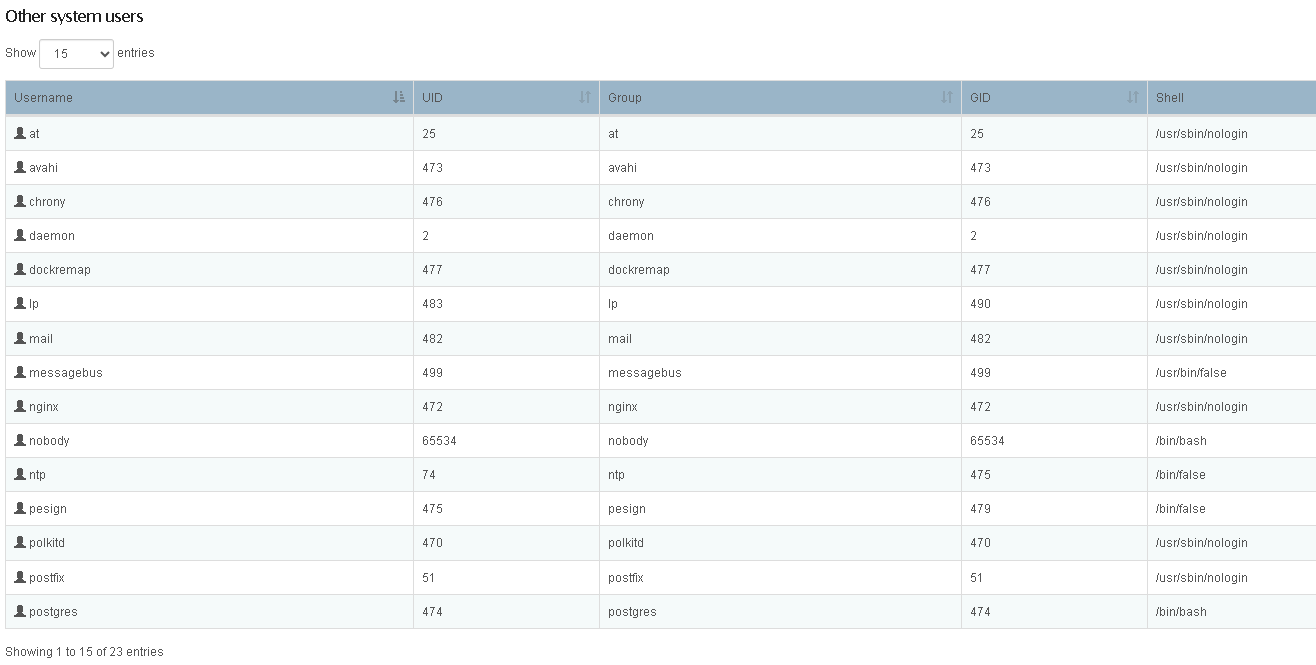
Error Traceback provided on the Web-UI
No GUI Errors
Footnotes ↩︎