Unknown internal error doing a POST to /api/shares/7/acl

Brief description of the problem

I have a single pool called Main on six LUKS-encrypted 6TB HDDs.

I have a few users and shares set up, among them this share called Media and a user named media that used to own the share.

At some point, “something happened” that caused all my shares to be reset to owner root and group root. I believe that they were also renumbered, in the incident.

Now, when I try to change the ownership of share Media back to media, I get an error message about an internal error with an empty traceback.

Detailed step by step instructions to reproduce the problem

I don’t know exactly how this happened.

I believe that the cause may have been that I tried adding an enclosure to the running system and while I was trying to plug the second SAS cable into the RAID controller, I may have bumped the first one, going to the existing, internal enclosure. So the system may have lost all the existing HDDs very temporarily.

I never saw an error message about this, though, and it’s too long ago to still find anything in the logs.

Web-UI screenshot
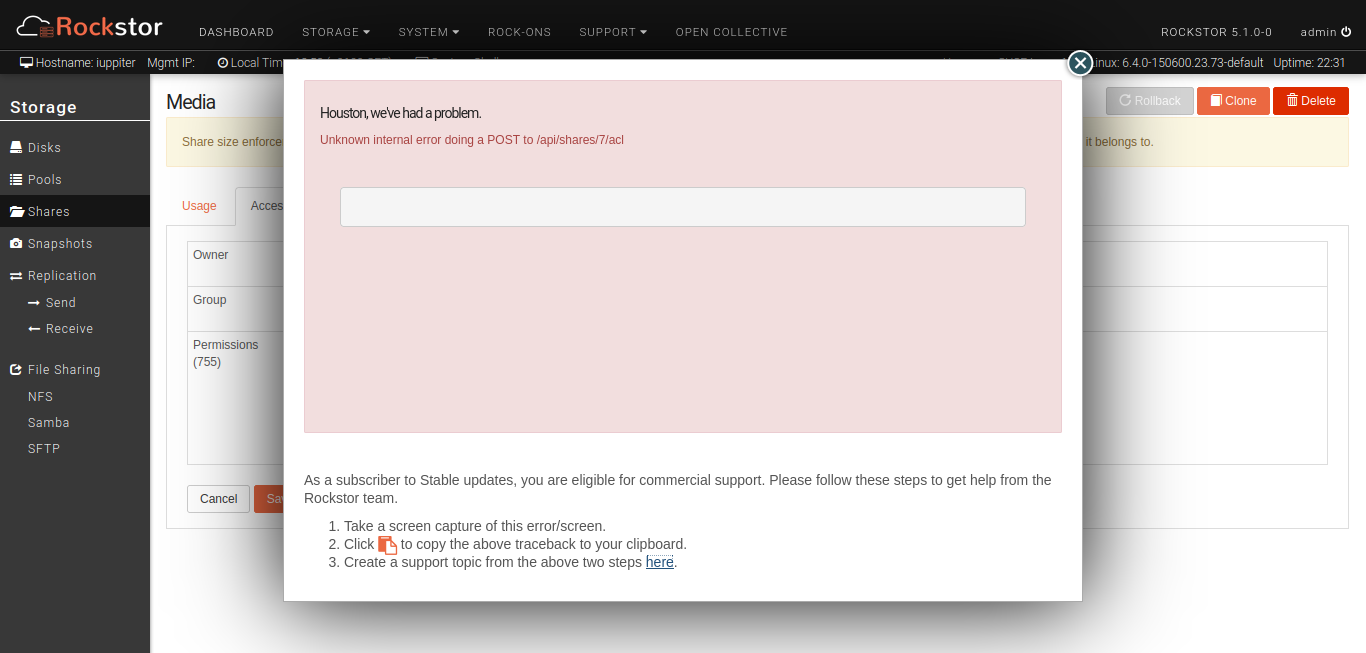
Error Traceback provided on the Web-UI is unfortunately empty

I found nothing relevant in rockstor.log, supervisord.log or other log files. Only gunicorn.log has the POST request, but nothing more:

127.0.0.1 - - [18/Nov/2025:13:54:30 +0100] "POST /api/shares/7/acl HTTP/1.0" 200 7741 "https://iuppiter.internal/" "Mozilla/5.0 (X11; Linux x86_64; rv:144.0) Gecko/20100101 Firefox/144.0" 286353ms

The only notable thing about the above log entry is that the request took over four and a half minutes…

I know this is not much to go on, but I’m willing to help in debugging this in any way I can, including not only posting log entries and configs, but running CLI commands and even going into manage.py shell and running any Python/Django commands that might help.

I have to admit, though, that I don’t really understand how share ownership actually works “under the hood” in Rockstor. I know that a pool is a btrfs filesystem and a share is essentially just a subvolume therein. But there’s more to it than that, isn’t there?

E.g. users get the shares they have access to mounted into their login dirs and things like that.

Needless to say that none of this currently works with my shares.

don’t know the root cause here, but does your Media share has a lot of filed on it? If yes, that could explain the “length” of the api call, if it waits for the chown command to apply to all filed/folders below the Media share since it’s supposed to be recursively executed:

2 Likes

Yeah, that’ll be it:

 # find /mnt2/Media/ | wc -l
227074

And I see that Rockstor does indeed just call chown -R …

… so that’s bound to take a while.

Now the question is whether it would help if I did the chown myself from the commandline and then ran the share ownership change from the WebUI after that.

A chown that has nothing to do should be way faster, right?

I would think so, yes.

Hmm, I tried that and it didn’t help.

Trying to change owner and group of Media to media:users still fails in the same way as outlined above. Long wait time and then an error w/o traceback.

But it’s noticeable that running

# chown -R media:users /mnt2/Media

… on the commandline still takes very long, even the second time around.

I didn’t time it the first time, but the second time it was:

real    3m45,956s
user    0m0,312s
sys     2m58,541s

yes, again, reading more about it, when you use the recursive option, it just blindly updates every file every time, regardless of whether it needs to change or has already been changed.

So, I guess, it does not make a difference via the WebUI, unless we look at possibly streamlining the mass chown changes for large devices by using an approach like (thanks to stackexchange.com) :

find /mnt2/<share>/ -not -user newuser -group newgroup -execdir chown newuser:newgroup {} \+

I read somewhere else that chown could take twice the amount of time vs. find in a recursive scenario (though I strongly assume that’s very much dependent on the actual scenario).

And/or maybe even introducing parallel processing via xargs -P (though that might come with its own challenges).

A quick additional search did not seem to highlight any “special” way of btrfs addressing it technically, so I assume the above approach could improve the large file volume changes more palatable, in conjunction with some tweaks to some time outs, etc.

But, that’s just my opinion :slight_smile: . I guess, now you have changed all your files via the direct recursive chown approach, so you could only test that a find approach will be substantially faster (since it’s probably not finding any files to change) compared to running chown against the share…

2 Likes

Personally, I think, I’d put the potentially long-running command into some sort of background job, but that’s sort of an architecturally change and comes with its own challenges, e.g. when something goes wrong.

I’m not sure that would be enough. Consider a case with hundreds of millions of files.

And it is, in this case:

# time find /mnt2/Media/ \( -not -user media -or -not -group users \) -execdir chown media:users {} \;

real    0m24,717s
user    0m0,392s
sys     0m22,947s

HOWEVER, for comparison, I changed all the user/group ownerships on the share back to root:root with another chown -R,

real    2m35,532s
user    0m0,380s
sys     2m27,247s

… and then ran the above find command again:

real    28m19,471s
user    7m36,286s
sys     11m58,883s

To be fair, it might be because I used the semicolon ; in my find command, rather than the plus sign +, which leads to many, many chown invocations, rather than one.

I’ll re-test this later with +.

Either way, to my mind, this should be the more common case, when changing the ownership of a share: pretty much all of the dirs and files have the wrong user/group and need to be adjusted. So I probably wouldn’t go for a solution that’s slower in this (presumably more common) case than in the (presumably rare) case where most/all of the file already have the correct owner/group.

I think something needs to be done here, but it’s probably a case for a GitHub issue, right?

2 Likes

As for my shares, whose ownership I still can’t change through the WebUI: What do I do now?

  1. I guess I could hot-patch the Rockstor code on my server to skip the chown step, which should let the transaction go through at last.

  2. Alternatively, I could repeat the steps I see in the code manually through the Django shell. More work and potentially error prone, but I’d have more control and direct insight into the result.

Any other ideas for options?

1 Like

Even using the plus sign + I got

# time find /mnt2/Media/ \( -not -user media -or -not -group users \) -execdir chown media:users {} \+

real    16m20,586s
user    0m59,085s
sys     5m7,712s

So no, find is not generally faster than just using a recursive chown.

1 Like

@tachikoma if you think there needs to be a change, then opening a Github issue is absolutely the right way to go.

One could consider may be this approach (and it should be for both chmod and chown to be consistent, I think):

foreground execution (i.e. in the screen where the change is currently made and from where chown or chmode is executed) will only make the change at the top-level of the share. And for a massive change (like in your above example, millions of files), introduce a background task (only to be scheduled once, unless there is a use case for periodically “realigning” file ownerships across a share) in the Scheduled tasks menu that will run this in the background (with status, etc.). Or, alternatively, leave the current change process alone, but add a note in the UI that states something to the effect of if more than 20K files on the share to be changed or the operation times out due to volume of files and directories to be changed, consider scheduling a task to run independently. That way, a pretty much empty share can still be conveniently changed in the same transaction, but for more complicated cases it can be executed asynchronously.

However, one would also have to consider what the implications (if any) would be that if it’s not somehow “online” executable: while the chown or chmod is running in the background, how can it be prevented that another transaction/activity triggered from the Rockstor WebUI interferes with this job.

Feel free to open a Github issue to continue that conversation there, since this is now much less about a functional solve than probably a development discussion.

2 Likes

Thanks for your continued input, @Hooverdan!

It’s fun to muse about how one would solve it, but it is ultimately up to the Rockstor devs.

Meanwhile, I still have a concrete problem to solve on my server.

I’ll probably end up doing that, but I’ll leave the implementation details and discussion up to the devs, as they’re the ones who need to maintain it and who know what the architecture is and how it should evolve etc.

I guess I could fork the project, implement a solution and submit a PR, but I’d only do so after the general approach is agreed upon.

And in the meantime I’m still wondering how to actually change the ownership of my shares.

Well, after the command line change of the owner, you could edit the corresponding Rockstor db table and update the owner:group information, which of course is manual, but then your physical and database view would be in sync again.

The table in question would be the storageadmin_share table in the storageadmin database, where you could update the owner and group for your specific share. A hack for sure, but then you would be in sync.

This is an example what the table looks like on a system with two shares.

 psql -U rocky -d storageadmin -c "SELECT * FROM storageadmin_share";
 id | qgroup | pqgroup |    name     | uuid |  size   | owner | group | perms |              toc              | subvol_name | replica | compression_algo | rusage | eusage | pool_id | pqgroup_eusage | pqgroup_rusage
----+--------+---------+-------------+------+---------+-------+-------+-------+-------------------------------+-------------+---------+------------------+--------+--------+---------+----------------+----------------
  1 | 0/265  | 2015/15 | rockon_root |      | 6291456 | root  | root  | 755   | 2025-11-19 18:36:18.202963+00 | rockon_root | f       |                  |    248 |    248 |       1 |            248 |            248
  4 | 0/266  | 2015/16 | config      |      | 1048576 | root  | root  | 755   | 2025-11-19 18:36:18.257792+00 | config      | f       | no               |     16 |     16 |       1 |             16 |             16
1 Like

Hmm… manually fiddling with the DB? :thinking:

I guess that gives me option no. 3 now…

I think I’ll try my idea no 1. first, then, only if that fails no. 2 and only then no. 3 as that’s in order of getting further away from Rockstor’s own code.

FWIW, I “solved” it like this now:

  1. I inserted an early return statement in line 53 of share_acl.py on my server (in /opt/rockstor/src/rockstor/storageadmin/views/) by just copying the actual return from the end of the method, thus skipping execution of the rest of it.
  2. I restarted Rockstor by running systemctl restart rockstor.service.
  3. I used the WebUI to change the Media share’s ownership, which returned real fast now.
  4. I commented my edit out again, saved and restarted Rockstor once more.

I’ll repeat that as necessary for other shares, keeping in mind that I’ll have to run chown and chmod manually from the commandline.

I just wanted to post that here in case someone else ever faces the same problem, finds this thread and wants to know how to fix it.

3 Likes

I think this interdependency issue is solvable via a check for on-going tasks for that Share before processing another task which is where we get to:

But we have begun this change via @Hooverdan recent abstraction of our scheduler Huey (previously we used ztaskd), but I’m reluctant to re-architect all our share changes to be wise to ongoing Huey tasks as we are set to replace Huey; now abstracted under the systemd task rockstor-scheduling see:

with are more Django native scheduler such as Django-Q2, but that in-turn has a remaining soft dependency on my current task and last issue in its milestone of updating us to Djanog 5.2:

as there are fledgling components within Django itself emerging to support a native scheduling mechanism that we want to be on-board with regarding our choice of Djanog-Q2 which the core developers here already have production experience with.

@tachikoma & @Hooverdan This has been a super useful thread in identifying a pressing need for us to, at least for now, run our Share chmod & chown via our existing Huey schedule. This will introduce around a 1 second delay prior to the command execution itself - but will at least get us over this initial show-stopper for larger file-sets. And will start us on developing what will be needed regarding task checking locations/sensitivities at least. But again I’m keen to not embark on this untill we are moved over to Djanog-Q2 if they are in fact to follow the upstream emerging Django background task efforts re standardisation. But even if not it would be far more ‘native’ that our current Huey with its contrib django compatibiliy. Plus I believe @Flox has identified a lack of interest on the part of Huey re employing the emerging Django task standard. Understandable given it is more Python native than Django native. Huey was chosen at the time, by me, as an effective way to get us onto something similar to what we had already re ztaskd which ended up being orphaned shortly after we adopted it!

Re the find trickery - I’m of the opinion that we don’t want to second guess stuff. I.e. we use the simplest tool for the job and run it as neat as we can. We simply can’t know what we are to be changing and any algorithm (read complexity) we develop on how we might work around a current or some-time performance issue will likely not age well.

As I see it currently. We fail on larger tasks re chmod / chown in Shares currently so that extra second via the small tasks we currently don’t fail-on - if we move them all to Huey - should be OK for failing at least less on the larger tasks. Or at least getting the job done eventually in the background. Again one we have a Django native scheduler we can way more easily build in guards and related user feedback re “A pending task on this Share is ongoing, this subsequent request has been scheduled for execution there-after.” type thing. With likely a page on all ongoing task across the system being trivial once we are more Django native re tasks. Bit by bit.

@Hooverdan is a core developer currently, as it goes, and driver of many elements within our development ongoing. Thanks again @Hooverdan , you recent push on finally removing our dependency on supervisord now looks to be quite timely no?

Cute work-around; and what ultimately has lead to me proposing here that we get this one at least jury rigged for the time being via our to-be-replaced Huey. I’ll look to creating a more focused issue shortly, if one does not already exist, and site this thread as has already been done on an existing issue we have open regarding this potential show-stopper:

Which @Flox & @Hooverdan have already been working through, with a couple of call-backs to this forum thread already.

Hope that helps

3 Likes

Umm… wow!

My silly little issue went far deeper into the innards of current Rockstor development than I would have suspected.

I don’t really have much to say. Except:

I wasn’t aware and didn’t mean to cause any offence.

At any rate, what I meant to say was more that I wouldn’t get into such speculation, since:

  1. I don’t know the codebase well enough and
  2. I was focused on fixing the issue at hand on my system and for that it was enough to know the current codepath.

Sorry @Hooverdan if it sounded like I was talking down to you or something like that. I definitely wasn’t and it was not my intention to do so, either. Not at all, I assure you.

I was a little confused why anyone would enter into such deep implementation discussions and share so many of their thoughts on the topic with me, a mere user.

That’s not a bad thing, though. On the contrary. I’m just not used to it (yet).

I’ll follow Rockstor development(s) with interest, once I have it working the way I want…

4 Likes

Absolutely no offense taken :slight_smile: I am glad that this issue is surfaced in more detail here, even through a “mere” user. We did have a few other messages in the past surrounding this I believe, but never got into it this deep.
And while the final architectural and technical decisions remain with the core team, we do not want to discount other approaches straigh out of hand … hence the attempt to welcome new forum members to the Rockstor “community”.
Highly technical discussion can probably start and end directly on GitHub (which task scheduler to use, whether to upgrade to the latest Django version, etc.) but topics that are directly observed as part of the user experience can very much benefit from the community input/experiences here on this forum.

1 Like